目次
概要
IPネットワーク上でDMVPNによるオーバーレイネットワークを構築します。NHRP Phase3の構成とします。ルーティングテーブル上はハブ&スポークですが、通信自体はフルメッシュで行います。
ネットワーク構成
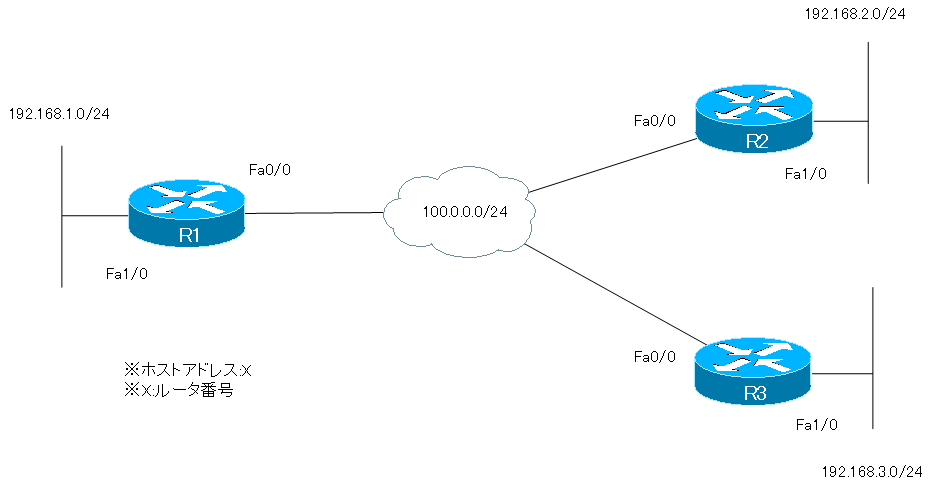
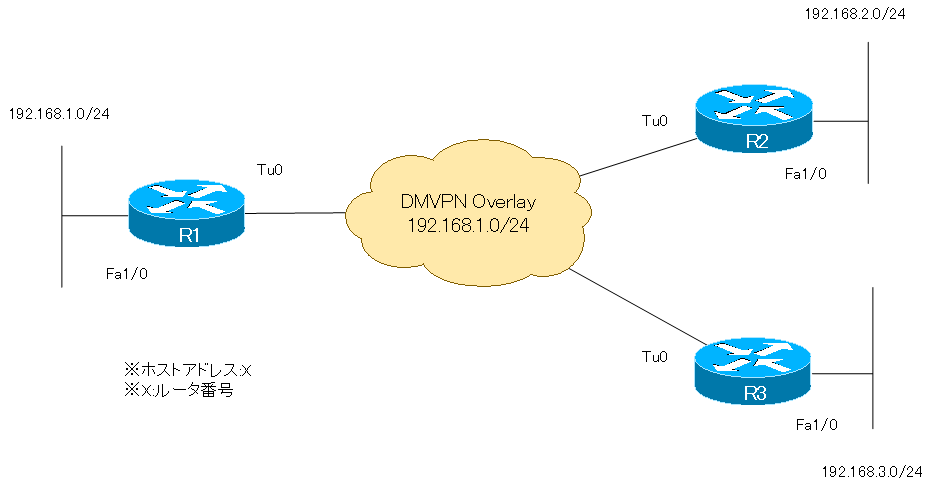
設定条件
DMVPN(NHRP Phase1)
- DMVPNのオーバーレイネットワークを作成します。各ルータでトンネルインタフェースを作成し、192.168.100.0/24のサブネットのIPアドレスを設定します。R1をハブルータ、R2、R3はスポークルータのハブ&スポーク構成とします。
- 各拠点間のトンネルインタフェースの通信はIPSecで暗号化します。IPSecのパラメータは以下のとおりとします。
| パラメータ | 設定 |
| 暗号化アルゴリズム | 3DES |
| ハッシュアルゴリズム | SHA-1 (デフォルト) |
| ピア認証 | PSK (パスワード:cisco) |
| Diffie-Hellman交換 | グループ2 |
| ライフタイム | 86400秒 (デフォルト) |
| トランスフォームセット名 | IPSEC |
| セキュリティプロトコル | ESP |
| 暗号化アルゴリズム | 3DES |
| 認証アルゴリズム | SHA-1 |
| モード | トランスポート |
- R2-R3間の通信はR1を経由して行います。
- EIGRP AS1によってルーティングテーブルに必要なルート情報を登録できるようにします。R1はトンネルインタフェースから集約ルートをアドバタイズします。
関連記事

DMVPN(NHRP Phase2)
- トンネルインタフェースやIPSecのパラメータは、NHRP Phase1と同じです。
- R2-R3間の通信はR1を経由せずに行います。
- ip nhrp redirectコマンド、ip nhrp shortcutコマンドを利用してはいけません。
関連記事

DMVPN(NHRP Phase3) -> このページで設定
- トンネルインタフェースやIPSecのパラメータは、NHRP Phase1と同じです。
- R2-R3間の通信はR1を経由せずに行います。
- EIGRP AS1によってルーティングテーブルに必要なルート情報を登録できるようにします。R1はトンネルインタフェースから集約ルートをアドバタイズします。
初期設定
DMVPN設定演習 NHRP Phase2の完了段階から開始します。
R1 Initial Configuration
!

!
version 12.4
service timestamps debug datetime msec
service timestamps log datetime msec
no service password-encryption
!
hostname R1
!
boot-start-marker
boot-end-marker
!
!
no aaa new-model
memory-size iomem 5
ip cef
!
!
!
!
no ip domain lookup
ip domain name lab.local
!
multilink bundle-name authenticated
!
!
!
!
!
!
!
!
!
!
!
!
!
!
!
!
!
!
!
!
!
archive
 log config
  hidekeys
!
!
crypto isakmp policy 1
 encr 3des
 authentication pre-share
 group 2
crypto isakmp key cisco address 0.0.0.0 0.0.0.0
!
!
crypto ipsec transform-set IPSEC esp-3des esp-sha-hmac
 mode transport
!
crypto ipsec profile DMVPN
 set transform-set IPSEC
!
!
!
!
!
!
!
!
interface Tunnel0
 ip address 192.168.100.1 255.255.255.0
 no ip redirects
 no ip next-hop-self eigrp 1
 ip nhrp authentication cisco
 ip nhrp map multicast dynamic
 ip nhrp network-id 123
 no ip split-horizon eigrp 1
 tunnel source FastEthernet0/0
 tunnel mode gre multipoint
 tunnel key 123
 tunnel protection ipsec profile DMVPN
!
interface FastEthernet0/0
 ip address 100.0.0.1 255.255.255.0
 duplex auto
 speed auto
!
interface FastEthernet1/0
 ip address 192.168.1.1 255.255.255.0
 duplex auto
 speed auto
!
router eigrp 1
 network 192.168.0.0 0.0.255.255
 no auto-summary
!
ip forward-protocol nd
!
!
no ip http server
no ip http secure-server
!
!
!
!
!
!
!
control-plane
!
!
!
!
!
!
!
!
!
!
line con 0
 exec-timeout 0 0
 privilege level 15
 logging synchronous
line aux 0
 exec-timeout 0 0
 privilege level 15
 logging synchronous
line vty 0 4
 login
!
!
end
R2 Initial Configuration
!

!
version 12.4
service timestamps debug datetime msec
service timestamps log datetime msec
no service password-encryption
!
hostname R2
!
boot-start-marker
boot-end-marker
!
!
no aaa new-model
memory-size iomem 5
ip cef
!
!
!
!
no ip domain lookup
ip domain name lab.local
!
multilink bundle-name authenticated
!
!
!
!
!
!
!
!
!
!
!
!
!
!
!
!
!
!
!
!
!
archive
 log config
  hidekeys
!
!
crypto isakmp policy 1
 encr 3des
 authentication pre-share
 group 2
crypto isakmp key cisco address 0.0.0.0 0.0.0.0
!
!
crypto ipsec transform-set IPSEC esp-3des esp-sha-hmac
 mode transport
!
crypto ipsec profile DMVPN
 set transform-set IPSEC
!
!
!
!
!
!
!
!
interface Tunnel0
 ip address 192.168.100.2 255.255.255.0
 no ip redirects
 ip nhrp authentication cisco
 ip nhrp map multicast 100.0.0.1
 ip nhrp map 192.168.100.1 100.0.0.1
 ip nhrp network-id 123
 ip nhrp nhs 192.168.100.1
 tunnel source FastEthernet0/0
 tunnel mode gre multipoint
 tunnel key 123
 tunnel protection ipsec profile DMVPN
!
interface FastEthernet0/0
 ip address 100.0.0.2 255.255.255.0
 duplex auto
 speed auto
!
interface FastEthernet1/0
 ip address 192.168.2.2 255.255.255.0
 duplex auto
 speed auto
!
router eigrp 1
 network 192.168.0.0 0.0.255.255
 no auto-summary
!
ip forward-protocol nd
!
!
no ip http server
no ip http secure-server
!
!
!
!
!
!
!
control-plane
!
!
!
!
!
!
!
!
!
!
line con 0
 exec-timeout 0 0
 privilege level 15
 logging synchronous
line aux 0
 exec-timeout 0 0
 privilege level 15
 logging synchronous
line vty 0 4
 login
!
!
end
R3 Initial Configuration
!

!
version 12.4
service timestamps debug datetime msec
service timestamps log datetime msec
no service password-encryption
!
hostname R3
!
boot-start-marker
boot-end-marker
!
!
no aaa new-model
memory-size iomem 5
ip cef
!
!
!
!
no ip domain lookup
ip domain name lab.local
!
multilink bundle-name authenticated
!
!
!
!
!
!
!
!
!
!
!
!
!
!
!
!
!
!
!
!
!
archive
 log config
  hidekeys
!
!
crypto isakmp policy 1
 encr 3des
 authentication pre-share
 group 2
crypto isakmp key cisco address 0.0.0.0 0.0.0.0
!
!
crypto ipsec transform-set IPSEC esp-3des esp-sha-hmac
 mode transport
!
crypto ipsec profile DMVPN
 set transform-set IPSEC
!
!
!
!
!
!
!
!
interface Tunnel0
 ip address 192.168.100.3 255.255.255.0
 no ip redirects
 ip nhrp authentication cisco
 ip nhrp map multicast 100.0.0.1
 ip nhrp map 192.168.100.1 100.0.0.1
 ip nhrp network-id 123
 ip nhrp nhs 192.168.100.1
 tunnel source FastEthernet0/0
 tunnel mode gre multipoint
 tunnel key 123
 tunnel protection ipsec profile DMVPN
!
interface FastEthernet0/0
 ip address 100.0.0.3 255.255.255.0
 duplex auto
 speed auto
!
interface FastEthernet1/0
 ip address 192.168.3.3 255.255.255.0
 duplex auto
 speed auto
!
router eigrp 1
 network 192.168.0.0 0.0.255.255
 no auto-summary
!
ip forward-protocol nd
!
!
no ip http server
no ip http secure-server
!
!
!
!
!
!
!
control-plane
!
!
!
!
!
!
!
!
!
!
line con 0
 exec-timeout 0 0
 privilege level 15
 logging synchronous
line aux 0
 exec-timeout 0 0
 privilege level 15
 logging synchronous
line vty 0 4
 login
!
!
end
設定・検証 DMVPN(NHRP Phase3)
Step1: IPSec Profileの適用解除
R1、R2、R3でいったん、IPSec Profileの適用を解除します。
R1/R2/R3 IPSec Profileの適用解除
interface Tunnel0
 no tunnel protection ipsec profile
Step2: R1 EIGRPの設定変更
R1のEIGRPの設定をDMVPN(Phase1)のときの状態に戻します。ハブルータのR1は集約ルート192.168.0.0/16をスポークルータであるR2/R3へアドバタイズします。
R1 EIGRPの設定変更
interface Tunnel0
 ip next-hop-self eigrp 1
 ip split-horizon eigrp 1
 ip summary-address eigrp 1 192.168.0.0 255.255.0.0
Step3: ルーティングテーブルと通信の確認
スポークルータでルーティングテーブルを確認します。
R2/R3 show ip route eigrp
R2#show ip route eigrp
D    192.168.0.0/16 [90/297270016] via 192.168.100.1, 00:01:14, Tunnel0
R3#show ip route eigrp
D    192.168.0.0/16 [90/297270016] via 192.168.100.1, 00:01:36, Tunnel0
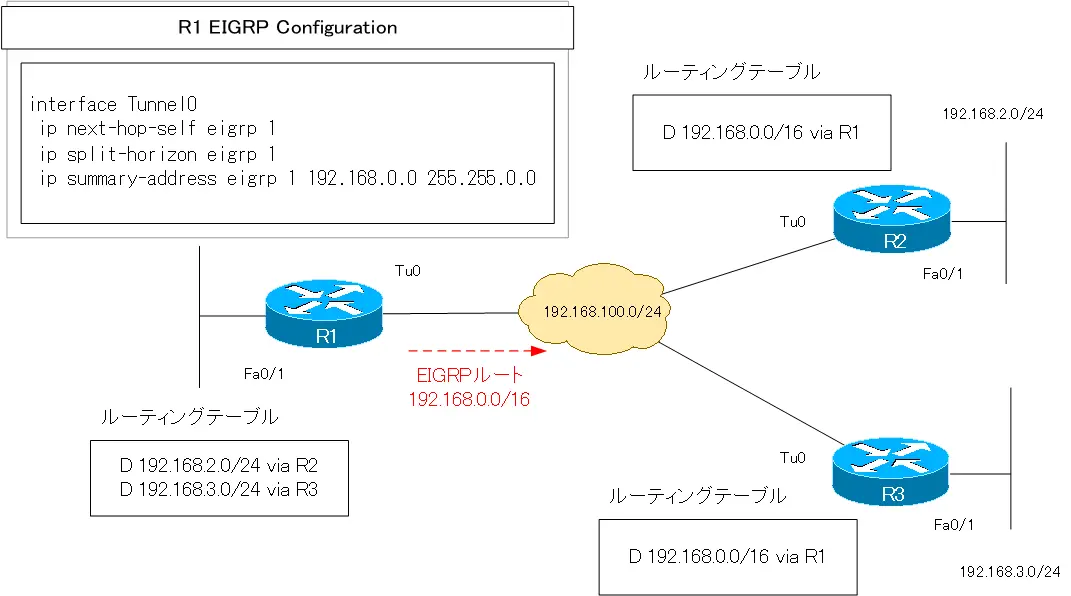
R2-R3間の通信を行うときには、R1からアドバタイズされた集約ルート192.168.0.0/16を利用することになります。そのため、スポーク間の通信はR1を経由します。
R2 traceroute
R2#traceroute 192.168.3.3 source 192.168.2.2

Type escape sequence to abort.
Tracing the route to 192.168.3.3

  1 192.168.100.1 32 msec 28 msec 32 msec
  2 192.168.100.3 60 msec *  80 msec
ルーティングテーブル上では、スポーク間の通信はハブであるR1を経由することになります。
Step4: NHRP Phase3の設定
NHRP Phase3の設定を行い、スポーク間で直接通信できるようにします。
R1 NHRP Phase3
interface Tunnel0
 ip nhrp redirect
R2/R3 NHRP Phase3
interface Tunnel0
 ip nhrp shortcut
Step5: ルーティングテーブル、NHRPキャッシュと通信の確認
スポークルータでルーティングテーブルを確認します。
R2/R3 show ip route eigrp
R2#show ip route eigrp
D    192.168.0.0/16 [90/297270016] via 192.168.100.1, 00:01:14, Tunnel0
R3#show ip route eigrp
D    192.168.0.0/16 [90/297270016] via 192.168.100.1, 00:01:36, Tunnel0
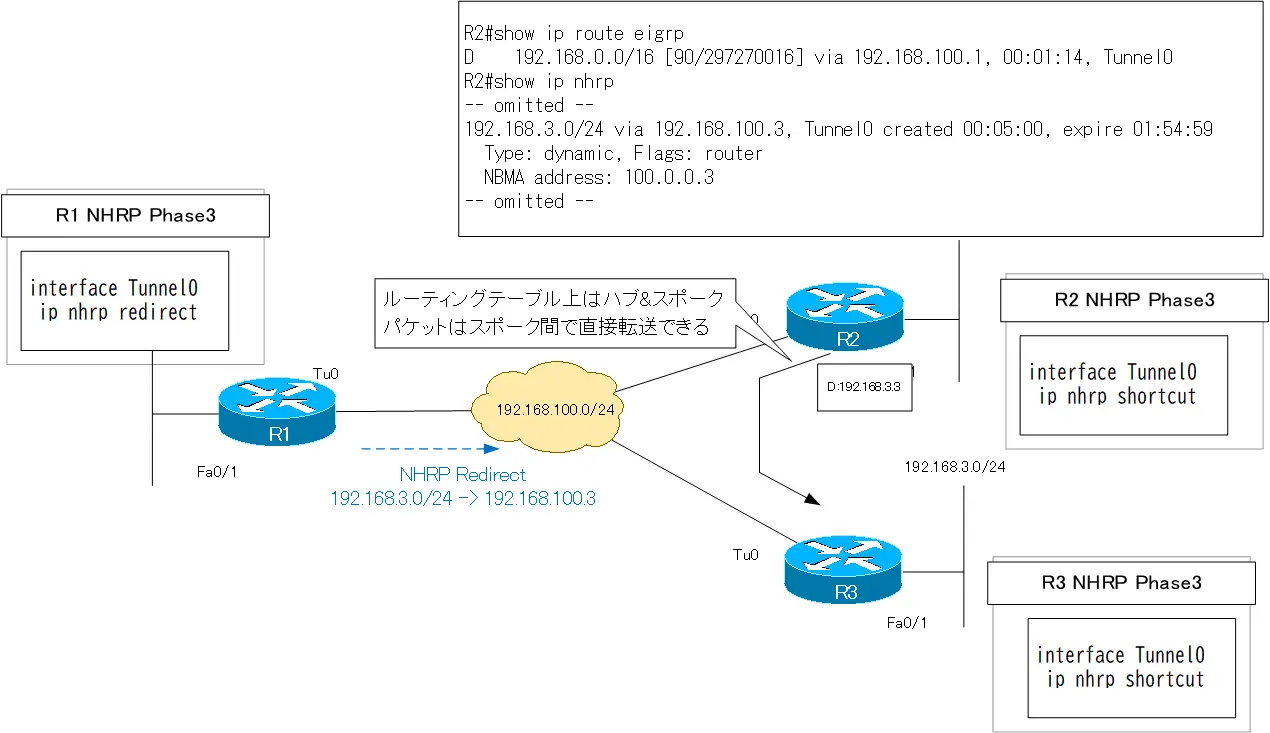
ルーティングテーブル自体はNHRP Phase3の設定を行っても変わっていません。R1を中心としたハブ&スポークです。しかし、スポーク間の通信は直接行われるようになっています。
R2 traceroute
R2#traceroute 192.168.3.3 source 192.168.2.2

Type escape sequence to abort.
Tracing the route to 192.168.3.3

  1 192.168.100.3 16 msec *  28 msec
R1はNHRPリダイレクトメッセージでスポークのルートをアドバタイズします。スポークルータのNHRPキャッシュを確認すると、スポークのルートに対するキャッシュがダイナミックに生成されていることがわかります。スポーク間の通信は、ルーティングテーブルをNHRPキャッシュが上書きして直接できるようになります。
R2 show ip nhrp
R2#show ip nhrp
192.168.2.0/24 via 192.168.100.2, Tunnel0 created 00:05:00, expire 01:54:59
  Type: dynamic, Flags: router unique local
  NBMA address: 100.0.0.2
    (no-socket)
192.168.3.0/24 via 192.168.100.3, Tunnel0 created 00:05:00, expire 01:54:59
  Type: dynamic, Flags: router
  NBMA address: 100.0.0.3
192.168.100.1/32 via 192.168.100.1, Tunnel0 created 00:40:27, never expire
  Type: static, Flags: used
  NBMA address: 100.0.0.1
192.168.100.2/32 via 192.168.100.2, Tunnel0 created 00:39:32, expire 01:20:27
  Type: dynamic, Flags: router unique local
  NBMA address: 100.0.0.2
    (no-socket)
192.168.100.3/32 via 192.168.100.3, Tunnel0 created 00:05:00, expire 01:54:59
  Type: dynamic, Flags: router implicit
  NBMA address: 100.0.0.3
Step6: IPSec Profileの適用
TunnelインタフェースのパケットをIPSecで暗号化するために、IPSec Profileを適用します。
R1/R2/R3 IPSec Profileの適用
interface Tunnel0
 tunnel protection ipsec profile DMVPN
Step7: IPSecの確認
R2-R3間のPingを実行したあと、IKE SAおよびIPSec SAを確認します。
R2 IPSecの確認
R2#ping 192.168.3.3 source 192.168.2.2

Type escape sequence to abort.
Sending 5, 100-byte ICMP Echos to 192.168.3.3, timeout is 2 seconds:
Packet sent with a source address of 192.168.2.2
!!!!!
Success rate is 100 percent (5/5), round-trip min/avg/max = 52/64/92 ms
R2#show crypto isakmp sa
IPv4 Crypto ISAKMP SA
dst             src             state          conn-id slot status
100.0.0.3       100.0.0.2       QM_IDLE           1004    0 ACTIVE
100.0.0.1       100.0.0.2       QM_IDLE           1005    0 ACTIVE

IPv6 Crypto ISAKMP SA

R2#show crypto ipsec sa

interface: Tunnel0
    Crypto map tag: Tunnel0-head-0, local addr 100.0.0.2

   protected vrf: (none)
   local  ident (addr/mask/prot/port): (100.0.0.2/255.255.255.255/47/0)
   remote ident (addr/mask/prot/port): (100.0.0.1/255.255.255.255/47/0)
   current_peer 100.0.0.1 port 500
     PERMIT, flags={origin_is_acl,}
    #pkts encaps: 13, #pkts encrypt: 13, #pkts digest: 13
    #pkts decaps: 14, #pkts decrypt: 14, #pkts verify: 14
    #pkts compressed: 0, #pkts decompressed: 0
    #pkts not compressed: 0, #pkts compr. failed: 0
    #pkts not decompressed: 0, #pkts decompress failed: 0
    #send errors 0, #recv errors 0

     local crypto endpt.: 100.0.0.2, remote crypto endpt.: 100.0.0.1
     path mtu 1500, ip mtu 1500, ip mtu idb FastEthernet0/0
     current outbound spi: 0xAB44D3EF(2873414639)

     inbound esp sas:
      spi: 0xB6A84BD5(3064482773)
        transform: esp-3des esp-sha-hmac ,
        in use settings ={Transport, }
        conn id: 9, flow_id: SW:9, crypto map: Tunnel0-head-0
        sa timing: remaining key lifetime (k/sec): (4575380/3544)
        IV size: 8 bytes
        replay detection support: Y
        Status: ACTIVE

     inbound ah sas:

     inbound pcp sas:

     outbound esp sas:
      spi: 0xAB44D3EF(2873414639)
        transform: esp-3des esp-sha-hmac ,
        in use settings ={Transport, }
        conn id: 10, flow_id: SW:10, crypto map: Tunnel0-head-0
        sa timing: remaining key lifetime (k/sec): (4575380/3544)
        IV size: 8 bytes
        replay detection support: Y
        Status: ACTIVE

     outbound ah sas:

     outbound pcp sas:

   protected vrf: (none)
   local  ident (addr/mask/prot/port): (100.0.0.2/255.255.255.255/47/0)
   remote ident (addr/mask/prot/port): (100.0.0.3/255.255.255.255/47/0)
   current_peer 100.0.0.3 port 500
     PERMIT, flags={origin_is_acl,}
    #pkts encaps: 5, #pkts encrypt: 5, #pkts digest: 5
    #pkts decaps: 5, #pkts decrypt: 5, #pkts verify: 5
    #pkts compressed: 0, #pkts decompressed: 0
    #pkts not compressed: 0, #pkts compr. failed: 0
    #pkts not decompressed: 0, #pkts decompress failed: 0
    #send errors 0, #recv errors 0

     local crypto endpt.: 100.0.0.2, remote crypto endpt.: 100.0.0.3
     path mtu 1500, ip mtu 1500, ip mtu idb FastEthernet0/0
     current outbound spi: 0x383F776(58980214)

     inbound esp sas:
      spi: 0x7003F5FA(1879307770)
        transform: esp-3des esp-sha-hmac ,
        in use settings ={Transport, }
        conn id: 7, flow_id: SW:7, crypto map: Tunnel0-head-0
        sa timing: remaining key lifetime (k/sec): (4507718/3544)
        IV size: 8 bytes
        replay detection support: Y
        Status: ACTIVE

     inbound ah sas:

     inbound pcp sas:

     outbound esp sas:
      spi: 0x383F776(58980214)
        transform: esp-3des esp-sha-hmac ,
        in use settings ={Transport, }
        conn id: 8, flow_id: SW:8, crypto map: Tunnel0-head-0
        sa timing: remaining key lifetime (k/sec): (4507718/3544)
        IV size: 8 bytes
        replay detection support: Y
        Status: ACTIVE

     outbound ah sas:

     outbound pcp sas:
R2ではハブルータであるR1との間だけではなく、R3との間でもIKE SAとIPSec SAが確立されていることがわかります。
最終的な設定ファイル
R1 Completed Configuration
!

!
version 12.4
service timestamps debug datetime msec
service timestamps log datetime msec
no service password-encryption
!
hostname R1
!
boot-start-marker
boot-end-marker
!
!
no aaa new-model
memory-size iomem 5
ip cef
!
!
!
!
no ip domain lookup
ip domain name lab.local
!
multilink bundle-name authenticated
!
!
!
!
!
!
!
!
!
!
!
!
!
!
!
!
!
!
!
!
!
archive
 log config
  hidekeys
!
!
crypto isakmp policy 1
 encr 3des
 authentication pre-share
 group 2
crypto isakmp key cisco address 0.0.0.0 0.0.0.0
!
!
crypto ipsec transform-set IPSEC esp-3des esp-sha-hmac
 mode transport
!
crypto ipsec profile DMVPN
 set transform-set IPSEC
!
!
!
!
!
!
!
!
interface Tunnel0
 ip address 192.168.100.1 255.255.255.0
 no ip redirects
 ip nhrp authentication cisco
 ip nhrp map multicast dynamic
 ip nhrp network-id 123
 ip nhrp redirect
 ip summary-address eigrp 1 192.168.0.0 255.255.0.0 5
 tunnel source FastEthernet0/0
 tunnel mode gre multipoint
 tunnel key 123
 tunnel protection ipsec profile DMVPN
!
interface FastEthernet0/0
 ip address 100.0.0.1 255.255.255.0
 duplex auto
 speed auto
!
interface FastEthernet1/0
 ip address 192.168.1.1 255.255.255.0
 duplex auto
 speed auto
!
router eigrp 1
 network 192.168.0.0 0.0.255.255
 no auto-summary
!
ip forward-protocol nd
!
!
no ip http server
no ip http secure-server
!
!
!
!
!
!
!
control-plane
!
!
!
!
!
!
!
!
!
!
line con 0
 exec-timeout 0 0
 privilege level 15
 logging synchronous
line aux 0
 exec-timeout 0 0
 privilege level 15
 logging synchronous
line vty 0 4
 login
!
!
end
R2 Completed Configuration
!

!
version 12.4
service timestamps debug datetime msec
service timestamps log datetime msec
no service password-encryption
!
hostname R2
!
boot-start-marker
boot-end-marker
!
!
no aaa new-model
memory-size iomem 5
ip cef
!
!
!
!
no ip domain lookup
ip domain name lab.local
!
multilink bundle-name authenticated
!
!
!
!
!
!
!
!
!
!
!
!
!
!
!
!
!
!
!
!
!
archive
 log config
  hidekeys
!
!
crypto isakmp policy 1
 encr 3des
 authentication pre-share
 group 2
crypto isakmp key cisco address 0.0.0.0 0.0.0.0
!
!
crypto ipsec transform-set IPSEC esp-3des esp-sha-hmac
 mode transport
!
crypto ipsec profile DMVPN
 set transform-set IPSEC
!
!
!
!
!
!
!
!
interface Tunnel0
 ip address 192.168.100.2 255.255.255.0
 no ip redirects
 ip nhrp authentication cisco
 ip nhrp map multicast 100.0.0.1
 ip nhrp map 192.168.100.1 100.0.0.1
 ip nhrp network-id 123
 ip nhrp nhs 192.168.100.1
 ip nhrp shortcut
 tunnel source FastEthernet0/0
 tunnel mode gre multipoint
 tunnel key 123
 tunnel protection ipsec profile DMVPN
!
interface FastEthernet0/0
 ip address 100.0.0.2 255.255.255.0
 duplex auto
 speed auto
!
interface FastEthernet1/0
 ip address 192.168.2.2 255.255.255.0
 duplex auto
 speed auto
!
router eigrp 1
 network 192.168.0.0 0.0.255.255
 no auto-summary
!
ip forward-protocol nd
!
!
no ip http server
no ip http secure-server
!
!
!
!
!
!
!
control-plane
!
!
!
!
!
!
!
!
!
!
line con 0
 exec-timeout 0 0
 privilege level 15
 logging synchronous
line aux 0
 exec-timeout 0 0
 privilege level 15
 logging synchronous
line vty 0 4
 login
!
!
end
R3 Completed Configuration
!

!
version 12.4
service timestamps debug datetime msec
service timestamps log datetime msec
no service password-encryption
!
hostname R3
!
boot-start-marker
boot-end-marker
!
!
no aaa new-model
memory-size iomem 5
ip cef
!
!
!
!
no ip domain lookup
ip domain name lab.local
!
multilink bundle-name authenticated
!
!
!
!
!
!
!
!
!
!
!
!
!
!
!
!
!
!
!
!
!
archive
 log config
  hidekeys
!
!
crypto isakmp policy 1
 encr 3des
 authentication pre-share
 group 2
crypto isakmp key cisco address 0.0.0.0 0.0.0.0
!
!
crypto ipsec transform-set IPSEC esp-3des esp-sha-hmac
 mode transport
!
crypto ipsec profile DMVPN
 set transform-set IPSEC
!
!
!
!
!
!
!
!
interface Tunnel0
 ip address 192.168.100.3 255.255.255.0
 no ip redirects
 ip nhrp authentication cisco
 ip nhrp map multicast 100.0.0.1
 ip nhrp map 192.168.100.1 100.0.0.1
 ip nhrp network-id 123
 ip nhrp nhs 192.168.100.1
 ip nhrp shortcut
 tunnel source FastEthernet0/0
 tunnel mode gre multipoint
 tunnel key 123
 tunnel protection ipsec profile DMVPN
!
interface FastEthernet0/0
 ip address 100.0.0.3 255.255.255.0
 duplex auto
 speed auto
!
interface FastEthernet1/0
 ip address 192.168.3.3 255.255.255.0
 duplex auto
 speed auto
!
router eigrp 1
 network 192.168.0.0 0.0.255.255
 no auto-summary
!
ip forward-protocol nd
!
!
no ip http server
no ip http secure-server
!
!
!
!
!
!
!
control-plane
!
!
!
!
!
!
!
!
!
!
line con 0
 exec-timeout 0 0
 privilege level 15
 logging synchronous
line aux 0
 exec-timeout 0 0
 privilege level 15
 logging synchronous
line vty 0 4
 login
!
!
end

インターネットVPN
- インターネットVPNの概要
- インターネットへの接続形態
- VPNサービスとは?
- NordVPN ~セキュアなVPNサービスを手軽に利用しよう~
- IPSecの概要
- IKE ~SAの生成と管理~
- IPSec サイト間VPNの動作
- IPSec サイト間VPNの設定 ~crypto mapによる設定~
- IPSec サイト間VPNの設定例
- [演習]サイトツーサイトIPSec-VPN(crypto map)
- [演習]サイトツーサイトIPSec-VPN(VTI)
- [演習]サイトツーサイトIPSec-VPN(VTI) トラブルシューティング
- IPSec 設定ミスの切り分けと修正 Part1
- IPSec 設定ミスの切り分けと修正 Part2
- IPSec 設定ミスの切り分けと修正 Part3
- DMVPNの設定例
- DMVPN設定演習[Cisco] NHRP Phase1
- DMVPN設定演習[Cisco] NHRP Phase2
- DMVPN設定演習[Cisco] NHRP Phase3
- SSL-VPNの実現方式
- SSL-VPN(クライアントレス)の設定例 (Cisco)
