H O M E > ネットワークのおべんきょしませんか? Cisco CCNA/CCNP/CCIE、ネットワークスペシャリスト試験の勉強にピッタリ > 2011年4月
2011年4月アーカイブの最新記事
DHCPの設定例
(所属カテゴリー:シスコ---投稿日時:2011年4月29日)
ネットワーク構成
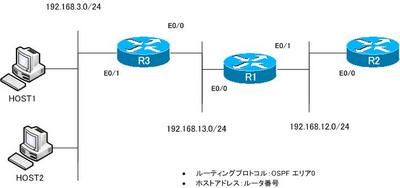
図 DHCPネットワーク構成
条件
- R1をDHCPサーバとします。HOST1、HOST2、R2 E0/0をDHCPクライアントとします。
- HOST1には192.168.13.101を割り当てます。
- R2 E0/0には192.168.12.2を割り当てます。
- DNSサーバのIPアドレスは1.1.1.1、ドメイン名はn-sutdy.comを割り当てます。ただし、これらの設定は1回のみ行います。
設定・確認
Step1:DHCPリレーエージェントの設定
HOST1、HOST2はDHCPサーバであるR1と別サブネットなので、R3でDHCPリレーエ ージェントの設定を行います。
R3
----------------------------------------------------------------------
interface Ethernet0/1
 ip helper-address 192.168.13.1
----------------------------------------------------------------------
Step2:DHCPプールの設定
R1で192.168.3.0/24のサブネットに対するDHCPプールを設定します。また、HOST2をDHCPクライアントとして設定します。
R1
----------------------------------------------------------------------
ip dhcp pool 192.168.3.0
   network 192.168.3.0 255.255.255.0
   default-router 192.168.3.3
----------------------------------------------------------------------
HOST2
----------------------------------------------------------------------
interface Ethernet0/0
 ip address dhcp
----------------------------------------------------------------------
Step3:マニュアルバインディングの設定
HOST1に192.168.3.101を固定的に割り当てるためにMACアドレスを利用して、 マニュアルバインディングの設定を行います。また、R2に192.168.12.2を固定 的に割り当てるためにクライアントIDを利用して、マニュアルバインディング の設定を行います。
※HOST1のMACアドレス:cc-03-1d-8c-00-00
※R2のMACアドレス:cc-01-1d-8c-00-00
R1
----------------------------------------------------------------------
ip dhcp pool HOST1
   host 192.168.3.101 255.255.255.0
   client-identifier 01cc.031d.8c00.00
   default-router 192.168.3.3
!
ip dhcp pool R2
   host 192.168.12.2 255.255.255.0
   client-identifier 01cc.011d.8c00.00
----------------------------------------------------------------------
HOST1
----------------------------------------------------------------------
interface Ethernet0/0
 ip address dhcp client-id Ethernet0/0
----------------------------------------------------------------------
R2
----------------------------------------------------------------------
interface Ethernet0/0
 ip address dhcp client-id Ethernet0/0
----------------------------------------------------------------------
Step4:DNSサーバ、ドメイン名のプール設定
ここまで作成したプールにDNSサーバとドメイン名の情報を継承させるために、 DNSサーバとドメイン名を指定したプールを作成します。
R1
----------------------------------------------------------------------
ip dhcp pool DNS_DOMAIN
   network 192.168.0.0 255.255.0.0
   domain-name n-study.com
   dns-server 1.1.1.1
----------------------------------------------------------------------
Step5:DHCPの確認
Step4までのDHCPの設定を確認します。DHCPサーバのR1ではshow ip dhcp pool/show ip dhcp bindingsコマンドでDHCPプールと割り当てているIPアドレスを確認します。
DHCPクライアントのHOST1、HOST2、R2ではshow ip interface brief/show dhcp server
でDHCPによって配布された設定を確認します。
R1
----------------------------------------------------------------------
R1#show ip dhcp pool

Pool HOST1 :
 Utilization mark (high/low)    : 100 / 0
 Subnet size (first/next)       : 0 / 0
 Total addresses                : 1
 Leased addresses               : 1
 Pending event                  : none
 0 subnet is currently in the pool :
 Current index        IP address range                    Leased addresses
 192.168.3.101        192.168.3.101    - 192.168.3.101     1

Pool 192.168.3.0 :
 Utilization mark (high/low)    : 100 / 0
 Subnet size (first/next)       : 0 / 0
 Total addresses                : 254
 Leased addresses               : 1
 Pending event                  : none
 1 subnet is currently in the pool :
 Current index        IP address range                    Leased addresses
 192.168.3.5          192.168.3.1      - 192.168.3.254     1

Pool DNS_DOMAIN :
 Utilization mark (high/low)    : 100 / 0
 Subnet size (first/next)       : 0 / 0
 Total addresses                : 65534
 Leased addresses               : 0
 Pending event                  : none
 1 subnet is currently in the pool :
 Current index        IP address range                    Leased addresses
 192.168.0.3          192.168.0.1      - 192.168.255.254   0

Pool R2 :
 Utilization mark (high/low)    : 100 / 0
 Subnet size (first/next)       : 0 / 0
 Total addresses                : 1
 Leased addresses               : 1
 Pending event                  : none
 0 subnet is currently in the pool :
 Current index        IP address range                    Leased addresses
 192.168.12.2         192.168.12.2     - 192.168.12.2      1
R1#show ip dhcp binding
Bindings from all pools not associated with VRF:
IP address          Client-ID/              Lease expiration        Type
                    Hardware address/
                    User name
192.168.3.4         0063.6973.636f.2d63.    Mar 02 2002 01:47 AM    Automatic
                    6330.342e.3164.3863.
                    2e30.3030.302d.4574.
                    302f.30
192.168.3.101       01cc.031d.8c00.00       Infinite                Manual
192.168.12.2        01cc.011d.8c00.00       Infinite                Manual
----------------------------------------------------------------------
R2
----------------------------------------------------------------------
R2#show ip int brief
Interface                  IP-Address      OK? Method Status                Protocol
Ethernet0/0                192.168.12.2    YES DHCP   up                    up
Ethernet0/1                unassigned      YES unset  administratively down down
Ethernet0/2                unassigned      YES unset  administratively down down
Ethernet0/3                unassigned      YES unset  administratively down down
Serial1/0                  unassigned      YES unset  administratively down down
Serial1/1                  unassigned      YES unset  administratively down down
Serial1/2                  unassigned      YES unset  administratively down down
Serial1/3                  unassigned      YES unset  administratively down down
R2#show dhcp server
   DHCP server: ANY (255.255.255.255)
    Leases:   6
    Offers:   6      Requests: 6     Acks : 6     Naks: 0
    Declines: 0      Releases: 15     Query: 0     Bad: 0
    DNS0:   1.1.1.1,   DNS1:  0.0.0.0
    Subnet: 255.255.255.0   DNS Domain: n-study.com
----------------------------------------------------------------------
HOST1
----------------------------------------------------------------------
HOST1#show ip int brief
Interface                  IP-Address      OK? Method Status                Protocol
Ethernet0/0                192.168.3.101   YES DHCP   up                    up
Ethernet0/1                unassigned      YES unset  administratively down down
Ethernet0/2                unassigned      YES unset  administratively down down
Ethernet0/3                unassigned      YES unset  administratively down down
Serial1/0                  unassigned      YES unset  administratively down down
Serial1/1                  unassigned      YES unset  administratively down down
Serial1/2                  unassigned      YES unset  administratively down down
Serial1/3                  unassigned      YES unset  administratively down down
HOST1#show dhcp server
   DHCP server: ANY (255.255.255.255)
    Leases:   2
    Offers:   2      Requests: 2     Acks : 2     Naks: 0
    Declines: 0      Releases: 3     Query: 0     Bad: 0
    DNS0:   1.1.1.1,   DNS1:  0.0.0.0
    Subnet: 255.255.255.0   DNS Domain: n-study.com
----------------------------------------------------------------------
HOST2
----------------------------------------------------------------------
HOST2#show ip int brief
Interface                  IP-Address      OK? Method Status                Protocol
Ethernet0/0                192.168.3.4     YES DHCP   up                    up
Ethernet0/1                unassigned      YES unset  administratively down down
Ethernet0/2                unassigned      YES unset  administratively down down
Ethernet0/3                unassigned      YES unset  administratively down down
Serial1/0                  unassigned      YES unset  administratively down down
Serial1/1                  unassigned      YES unset  administratively down down
Serial1/2                  unassigned      YES unset  administratively down down
Serial1/3                  unassigned      YES unset  administratively down down
HOST2#show dhcp server
   DHCP server: ANY (255.255.255.255)
    Leases:   2
    Offers:   2      Requests: 2     Acks : 2     Naks: 0
    Declines: 0      Releases: 3     Query: 0     Bad: 0
    DNS0:   1.1.1.1,   DNS1:  0.0.0.0
    Subnet: 255.255.255.0   DNS Domain: n-study.com
----------------------------------------------------------------------
2011年4月アーカイブのその他の記事一覧
- 【PR】Geneが講師を担当するセミナー情報
- 【PR】たくさんのIT製品・サービス情報を素早くキャッチ!ITエンジニア必見『キーマンズネット』
- 【PR】
『TSUTAYA DISCAS』/ネットでいつでもどこでもお気楽レンタルDVD!
この部分の広告を募集しています。詳しくはこちら
各コンテンツの最新記事
有料コンテンツライブラリ(ITエンジニア教育資料)
- CCIEラボ試験対策 MPLS-VPN演習シナリオ Vol.1 (2012年5月16日)2012:05:16:10:36:56
- CCIEラボ試験対策 MPLS-VPNトラブルシュートシナリオ Vol.1 (2012年2月 1日)2012:02:01:11:11:21
- CCIE Routing & Switching Trouble Shooting対策 Part1 (2010年9月 1日)2010:09:01:14:57:48
- 日本語で勉強できる「CCIE Routing & Switching ラボ模擬試験 Vol.1」 (2010年7月 8日)2010:07:08:15:21:07
- NE向けセミナー「MPLS-VPNの仕組み」教材セット (2010年7月 7日)2010:07:07:22:57:07
ネットワーク技術雑誌レビュー
- 日経コミュニケーション 2010.7 「"今できる"最善のユーザ認証を考える」 (2010年7月 7日)2010:07:07:17:20:06
- 日経NETWORK 2010.07 「話題の端末iPadで学ぼう! 無線通信技術の基本」 (2010年6月30日)2010:06:30:17:12:32
- 日経NETWORK 2010.3「サーバ管理者のための 仮想スイッチ講座 第1回」 (2010年4月 2日)2010:04:02:13:57:45
- 日経コミュニケーション 2010.3.1「ネット端末が開く新境地 迫るAndoroidビッグバン」 (2010年3月10日)2010:03:10:13:47:08
- 日経コミュニケーション 2010.1.15 KDDIの次世代ネットワーク (2010年1月29日)2010:01:29:13:20:02
ベンダ資格受験記
- Cisco CCNA 640-802J受験記(Gene) (2010年2月12日)2010:02:12:14:32:00
- Cisco CCNA 640-802J受験記(しょうさん) (2008年10月27日)2008:10:27:18:01:13
- Cisco CCNP BSCI 642-901J 受験記 Sさん (2008年9月 8日)2008:09:08:11:19:57
- ベンダ資格受験記 CCNP ISCW 642-825J shinさん (2008年5月27日)2008:05:27:11:48:12
- Cisco CCNP ONT 642-845J受験記 (Gene) (2008年3月14日)2008:03:14:17:17:19
オススメ!ネットワーク技術雑誌・書籍
- Ciscoネットワーク構築教科書 設定編 (2010年7月14日)2010:07:14:16:07:30
- 「まんがでわかった! ネットワーク入門」 (2010年2月12日)2010:02:12:14:25:30
- Cisco WAN実践ケーススタディ (2008年10月27日)2008:10:27:17:54:50
- Cisco ISR ルータ教科書 (2006年2月27日)2006:02:27:16:23:01
- 日経コミュニケーション (2005年6月10日)2005:06:10:16:19:31
MindMapでおべんきょ
- 日経SYSTEMS 2008年9月号にマインドマップの記事があるようです (2008年9月 8日)2008:09:08:18:59:40
- 「みる」という行為は、「目」ではなく、実は・・・ (2008年7月 3日)2008:07:03:14:23:30
- マインドマップの用途は? (2008年7月 2日)2008:07:02:17:31:59
- メンタルリテラシー (2008年5月27日)2008:05:27:20:49:33
- マインドマップ「暗号解読」 (2008年5月15日)2008:05:15:21:30:51
結果を出せるコーチング
- コーチングを受ける前に その2 (2008年7月11日)2008:07:11:11:59:01
- コーチングを受ける前に その1 (2008年7月 3日)2008:07:03:23:26:03
- コーチングの進め方 (2008年7月 3日)2008:07:03:15:45:58
- エンジニアサポート専属コーチプロフィール (2008年5月26日)2008:05:26:11:04:19
- コーチングサービスのご案内 (2008年5月11日)2008:05:11:21:24:52
Geneのつぶやき
- Camtasia Studio 最新バージョンにアップデートする (2010年7月20日)2010:07:20:12:07:15
- ニンテンドー 3DSに採用!メガネ不要の3D立体視の仕組み (2010年7月 7日)2010:07:07:12:18:46
- 6/28 ブルーノート東京 Larry Carlton & Tak Matsumoto "TAKE YOUR PICK" (2010年6月29日)2010:06:29:13:03:21
- iPadの分解写真 (2010年6月29日)2010:06:29:12:23:20
- VAIO Type Zを買う (2009年10月27日)2009:10:27:20:01:13
The Power of Words
- ビジネス思考力のキモは (2009年3月 4日)2009:03:04:17:01:50
- 可能性を信じて存在に意識を向けてくれる人によって (2009年2月 3日)2009:02:03:17:06:37
- アメリカの金融資本主義の世界では、 (2009年2月 3日)2009:02:03:16:56:20
- 彼は完璧ではないが、 (2009年2月 3日)2009:02:03:16:49:33
- いつも晴れ晴れとした (2009年1月15日)2009:01:15:14:57:51
スポンサードリンク
コンテンツメニュー

- プロトコルと通信アーキテクチャ
- LAN
- WAN
- TCP/IP
- IPv6
- マルチキャスト
- ネットワーク機器
- IPルーティング
- QoS
- ネットワークセキュリティ
- シスコ
- Dynamips/Dynagen
- SoftEtherのススメ
- ネットワークスペシャリスト
- ITキーワード
- その他








スポンサードリンク


スポンサードリンク
RSS記事配信
スポンサードリンク