
Table of Contents
Summary
Stub area configuration can reduce the number of LSAs advertised to small networks; here is a specific example of stub area configuration on a Cisco router.
Related article
The following article explains the details of OSPF stub areas and the configuration commands on Cisco routers.
Network Diagram
Configure the stub area with the following network diagram.
![Figure OSPF Stub Area Configuration Example [Cisco] Network diagram](https://www.n-study.com/wp-content/uploads/2021/08/en-cisco-ospf-stub-area-configuration-example01.png)
Configuration Condition
Normal stub area
- Ensure that LSA Type 5 is not advertised in Area 2.
Totally stub area
- Minimize LSDB in area 3.
NSSA
- Ensure that LSA Type 5 is not advertised in Area 4.
Totally NSSA
- Ensure that Area 5 is not advertised with an LSA Type 3 that describes the network address of another area.
Initial Configuration
Proceed from the state where the OSPF configuration is complete with all areas of the OSPF domain as standard areas. We have also completed the proper routing and redistribution configuration for the non-OSPF domain.
Configuring and Verifying
Normal stub area
Step1:Verify the LSDB (before configuring stub area)
To prevent LSA Type 5 from being advertised in Area 2, configure Area 2 as a normal stub area. If you look at the LSDB of area 2 in R22 before configuring stub area, you will see the following
R22
R22#show ip ospf database

            OSPF Router with ID (22.22.22.22) (Process ID 1)

                Router Link States (Area 2)

Link ID         ADV Router      Age         Seq#       Checksum Link count
21.21.21.21     21.21.21.21     56          0x80000003 0x0035ED 1
22.22.22.22     22.22.22.22     55          0x80000003 0x009567 2

                Net Link States (Area 2)

Link ID         ADV Router      Age         Seq#       Checksum
10.2.12.22      22.22.22.22     55          0x80000001 0x001AEC

                Summary Net Link States (Area 2)

Link ID         ADV Router      Age         Seq#       Checksum
10.0.0.0        21.21.21.21     85          0x80000002 0x00F0E2
10.1.1.0        21.21.21.21     51          0x80000001 0x004A7D
10.1.12.0       21.21.21.21     51          0x80000001 0x00C6F6
10.3.1.0        21.21.21.21     41          0x80000001 0x003293
10.3.12.0       21.21.21.21     41          0x80000001 0x00AE0D
10.4.1.0        21.21.21.21     41          0x80000001 0x00269E
10.4.12.0       21.21.21.21     41          0x80000001 0x00A218
10.5.1.0        21.21.21.21     54          0x80000001 0x001AA9
10.5.12.0       21.21.21.21     54          0x80000001 0x009623

                Summary ASB Link States (Area 2)

Link ID         ADV Router      Age         Seq#       Checksum
12.12.12.12     21.21.21.21     54          0x80000001 0x00A102
42.42.42.42     21.21.21.21     44          0x80000001 0x0038F2
52.52.52.52     21.21.21.21     54          0x80000001 0x006A98

                Type-5 AS External Link States

Link ID         ADV Router      Age         Seq#       Checksum Tag
172.16.1.0      12.12.12.12     101         0x80000001 0x00EDC4 0
172.16.23.0     12.12.12.12     102         0x80000001 0x00FAA1 0
172.17.0.0      42.42.42.42     101         0x80000001 0x0065D4 0
172.18.0.0      52.52.52.52     95          0x80000001 0x002CE4 0
There are LSA Type 4 and LSA Type 5 for non-OSPF domains in the LSDB of Area 2.
Step2:Configuring normal stub area
To prevent LSA Type 5 from being advertised in Area 2, make Area 2 a normal stub area. Enter the following commands on R21 and R22, which are included in Area 2.
R21/R22
router ospf 1
 area 2 stub
Step3:Verify the LSDB (after configuring stub area)
After configuring area 2 as normal stub area, verify the LSDB again with R22.
R22
R22#show ip ospf database

            OSPF Router with ID (22.22.22.22) (Process ID 1)

                Router Link States (Area 2)

Link ID         ADV Router      Age         Seq#       Checksum Link count
21.21.21.21     21.21.21.21     11          0x80000005 0x004FD3 1
22.22.22.22     22.22.22.22     8           0x80000005 0x00AF4D 2

                Net Link States (Area 2)

Link ID         ADV Router      Age         Seq#       Checksum
10.2.12.22      22.22.22.22     8           0x80000003 0x0034D2

                Summary Net Link States (Area 2)

Link ID         ADV Router      Age         Seq#       Checksum
0.0.0.0         21.21.21.21     18          0x80000001 0x0039B0
10.0.0.0        21.21.21.21     18          0x80000003 0x000DC7
10.1.1.0        21.21.21.21     18          0x80000002 0x006662
10.1.12.0       21.21.21.21     18          0x80000002 0x00E2DB
10.3.1.0        21.21.21.21     18          0x80000002 0x004E78
10.3.12.0       21.21.21.21     18          0x80000002 0x00CAF1
10.4.1.0        21.21.21.21     18          0x80000002 0x004283
10.4.12.0       21.21.21.21     20          0x80000002 0x00BEFC
10.5.1.0        21.21.21.21     20          0x80000002 0x00368E
10.5.12.0       21.21.21.21     20          0x80000002 0x00B208
By configuring normal stub areas, LSA Type 5 is not advertised in Area 2. Correspondingly, LSA Type 4 is also not advertised. And to ensure connectivity to networks in non-OSPF domains, an LSA Type 3 representing the default route is advertised. In other words, LSA Type 5, which represents a network in a non-OSPF domain, is summarized into the default route, LSA Type 3.

Totally stub area
Step1:Verify the LSDB (before configuring totally stub area)
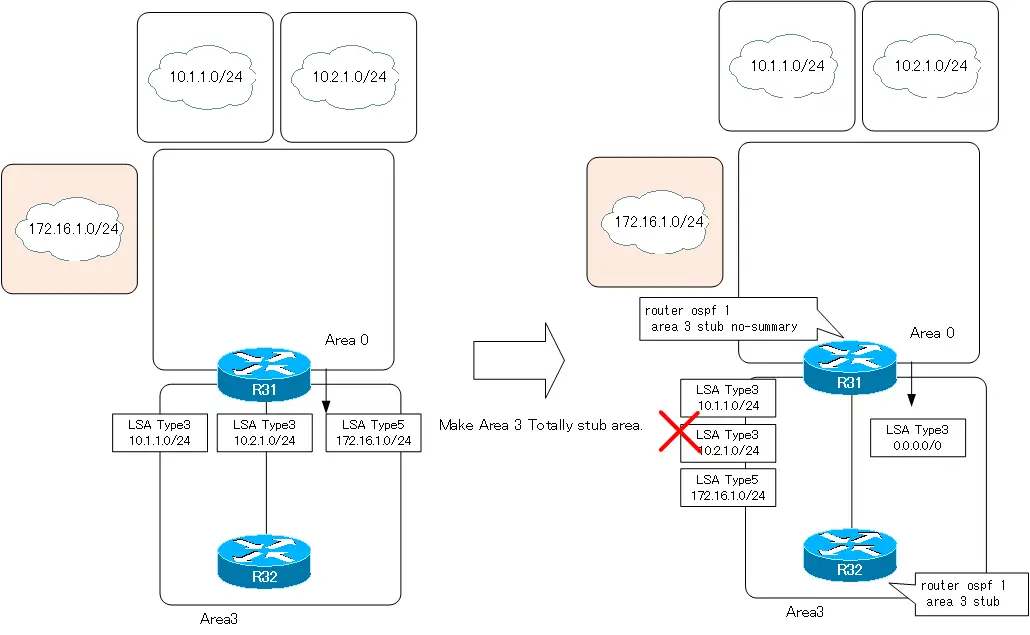
To minimize the LSDB of an area, make the area a Totally Stub Area. Only LSA Type1/Type2 describing the details in the area and LSA Type3 describing the default route 0.0.0.0/0 will be registered in the LSDB of the Totally Stub Area.
Verify the LSDB before configuring Area 3 as a Totally Stub Area. the output of the show ip ospf database command on R32 is as follows.
R32
R32#show ip ospf database

            OSPF Router with ID (32.32.32.32) (Process ID 1)

                Router Link States (Area 3)

Link ID         ADV Router      Age         Seq#       Checksum Link count
31.31.31.31     31.31.31.31     1508        0x80000003 0x003F7D 1
32.32.32.32     32.32.32.32     1506        0x80000003 0x00B0E4 2

                Net Link States (Area 3)

Link ID         ADV Router      Age         Seq#       Checksum
10.3.12.32      32.32.32.32     1506        0x80000001 0x00C7BB

                Summary Net Link States (Area 3)

Link ID         ADV Router      Age         Seq#       Checksum
10.0.0.0        31.31.31.31     1533        0x80000002 0x00C3E7
10.1.1.0        31.31.31.31     1493        0x80000001 0x001D82
10.1.12.0       31.31.31.31     1493        0x80000001 0x0099FB
10.2.1.0        31.31.31.31     1020        0x80000003 0x000D8F
10.2.12.0       31.31.31.31     1493        0x80000001 0x008D07
10.4.1.0        31.31.31.31     1493        0x80000001 0x00F8A3
10.4.12.0       31.31.31.31     1493        0x80000001 0x00751D
10.5.1.0        31.31.31.31     1505        0x80000001 0x00ECAE
10.5.12.0       31.31.31.31     1505        0x80000001 0x006928

                Summary ASB Link States (Area 3)

Link ID         ADV Router      Age         Seq#       Checksum
12.12.12.12     31.31.31.31     1505        0x80000001 0x007407
42.42.42.42     31.31.31.31     1505        0x80000001 0x000BF7
52.52.52.52     31.31.31.31     1505        0x80000001 0x003D9D

                Type-5 AS External Link States

Link ID         ADV Router      Age         Seq#       Checksum Tag
172.16.1.0      12.12.12.12     1558        0x80000001 0x00EDC4 0
172.16.23.0     12.12.12.12     1559        0x80000001 0x00FAA1 0
172.17.0.0      42.42.42.42     1558        0x80000001 0x0065D4 0
172.18.0.0      52.52.52.52     1552        0x80000001 0x002CE4 0
LSA Type4/Type5 for networks in non-OSPF domains and LSA Type3 for networks in other areas are registered in the LSDB of Area 2 before it is made a totality stub area.
Step2:Configuring totally stub area
To minimize the LSDB in area 3, configure area 3 as a totality stub area. Add the no-summary option to the stub area configuration in R31 of the ABR; R32 is the normal stub area configuration.
R31
router ospf 1
 area 3 stub no-summary
R32
router ospf 1
 area 3 stub
Step3:Verify the LSDB (after configuring totally stub area)
After configuring area 3 as the Totally Stub Area, verify the LSDB again with R32.
R32
R32#show ip ospf database

            OSPF Router with ID (32.32.32.32) (Process ID 1)

                Router Link States (Area 3)

Link ID         ADV Router      Age         Seq#       Checksum Link count
31.31.31.31     31.31.31.31     84          0x80000005 0x005963 1
32.32.32.32     32.32.32.32     80          0x80000005 0x00CACA 2

                Net Link States (Area 3)

Link ID         ADV Router      Age         Seq#       Checksum
10.3.12.32      32.32.32.32     80          0x80000003 0x00E1A1

                Summary Net Link States (Area 3)

Link ID         ADV Router      Age         Seq#       Checksum
0.0.0.0         31.31.31.31     93          0x80000001 0x000CB5
By configuring the area as a Totally Stub area, the LSDB in Area 3 will no longer have LSA Type 4/Type 5 for non-OSPF domains. And there will be no LSA Type 3 representing the network address of the other area. To ensure reachability to the non-OSPF domain and the other area’s network, LSA Type3 representing the default route 0.0.0.0/0 has been generated. This means that non-OSPF domains and other area networks are summarized into the default route, LSA Type 3.
NSSA
Step1:Verify the LSDB (before configuring NSSA)
There is a non-OSPF domain beyond area 4 that is routing with static routes. and R43 is an ASBR. To prevent LSA Type 5 from being advertised, but still allow ASBRs to be placed, make Area 4 NSSA.
Verify the LSDB before configuring area 4 as NSSA. the output of the show ip ospf database command on R42 is as follows.
R42
R42#show ip ospf database

            OSPF Router with ID (42.42.42.42) (Process ID 1)

                Router Link States (Area 4)

Link ID         ADV Router      Age         Seq#       Checksum Link count
41.41.41.41     41.41.41.41     1452        0x80000004 0x00470E 1
42.42.42.42     42.42.42.42     1488        0x80000004 0x00CF5B 2

                Net Link States (Area 4)

Link ID         ADV Router      Age         Seq#       Checksum
10.4.12.42      42.42.42.42     1488        0x80000002 0x00738B

                Summary Net Link States (Area 4)

Link ID         ADV Router      Age         Seq#       Checksum
10.0.0.0        41.41.41.41     1452        0x80000003 0x0094ED
10.1.1.0        41.41.41.41     1452        0x80000002 0x00ED88
10.1.12.0       41.41.41.41     1452        0x80000002 0x006A02
10.2.1.0        41.41.41.41     943         0x80000004 0x00DD95
10.2.12.0       41.41.41.41     1452        0x80000002 0x005E0D
10.3.1.0        41.41.41.41     1587        0x80000003 0x00D39F
10.3.12.0       41.41.41.41     1452        0x80000002 0x005218
10.5.1.0        41.41.41.41     1454        0x80000002 0x00BDB4
10.5.12.0       41.41.41.41     1454        0x80000002 0x003A2E

                Summary ASB Link States (Area 4)

Link ID         ADV Router      Age         Seq#       Checksum
12.12.12.12     41.41.41.41     1454        0x80000002 0x00450D
52.52.52.52     41.41.41.41     1454        0x80000002 0x000EA3

                Type-5 AS External Link States

Link ID         ADV Router      Age         Seq#       Checksum Tag
172.16.1.0      12.12.12.12     1484        0x80000002 0x00EBC5 0
172.16.23.0     12.12.12.12     1485        0x80000002 0x00F8A2 0
172.17.0.0      42.42.42.42     1491        0x80000002 0x0063D5 0
172.18.0.0      52.52.52.52     1480        0x80000002 0x002AE5 0
There are LSA Type 4 and LSA Type 5 for non-OSPF domains in the LSDB of Area 4.
Step2:Configuring NSSA
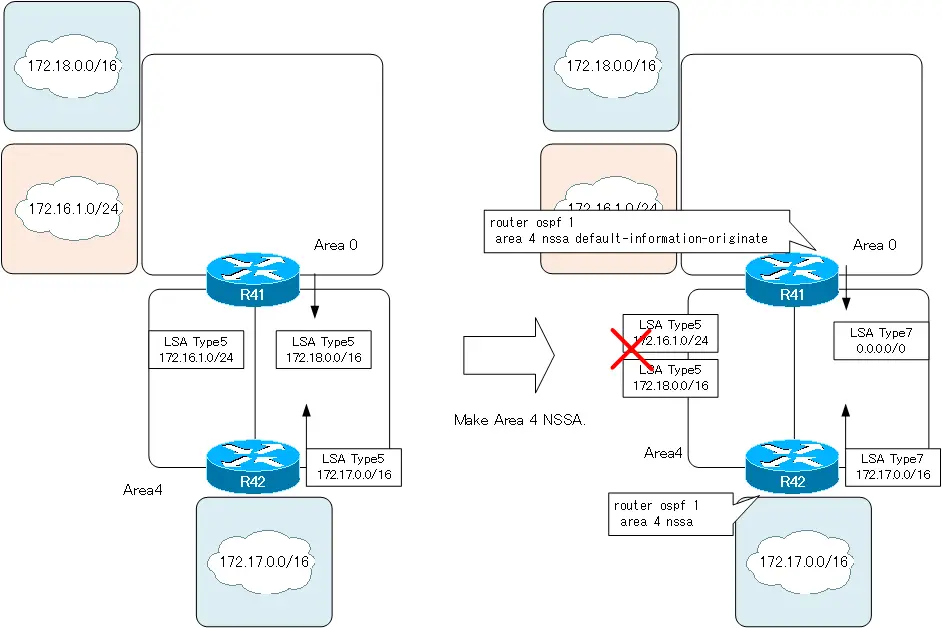
Configure area 4 as NSSA. To ensure connectivity to the EIGRP domain and the domain of the static route of 172.18.0.0/16, allow R41 to generate a default route in the NSSA.
R41
router ospf 1
 area 4 nssa default-information-originate
R42
router ospf 1
 area 4 nssa
Step3:Verify the LSDB (after configuring NSSA)
After configuring area 4 as NSSA, verify the LSDB again in R42.
R42
R42#show ip ospf database

            OSPF Router with ID (42.42.42.42) (Process ID 1)

                Router Link States (Area 4)

Link ID         ADV Router      Age         Seq#       Checksum Link count
41.41.41.41     41.41.41.41     3           0x80000007 0x00EC5D 1
42.42.42.42     42.42.42.42     6           0x80000006 0x0071B1 2

                Net Link States (Area 4)

Link ID         ADV Router      Age         Seq#       Checksum
10.4.12.42      42.42.42.42     2           0x80000004 0x0015E1

                Summary Net Link States (Area 4)

Link ID         ADV Router      Age         Seq#       Checksum
10.0.0.0        41.41.41.41     8           0x80000004 0x003843
10.1.1.0        41.41.41.41     8           0x80000003 0x0091DD
10.1.12.0       41.41.41.41     8           0x80000003 0x000E57
10.2.1.0        41.41.41.41     8           0x80000005 0x0081EA
10.2.12.0       41.41.41.41     8           0x80000003 0x000262
10.3.1.0        41.41.41.41     8           0x80000005 0x0075F5
10.3.12.0       41.41.41.41     8           0x80000003 0x00F56D
10.5.1.0        41.41.41.41     10          0x80000003 0x00610A
10.5.12.0       41.41.41.41     10          0x80000003 0x00DD83

                Type-7 AS External Link States (Area 4)

Link ID         ADV Router      Age         Seq#       Checksum Tag
0.0.0.0         41.41.41.41     10          0x80000001 0x003AD2 0
172.17.0.0      42.42.42.42     98          0x80000001 0x00CA2C 0
Area 4 is configured as NSSA, so LSDB will no longer have LSA Type 5 and LSA Type 4. And, as ASBR, R42 generates an LSA Type 7 for 172.17.0.0/16, which represents the network in the non-OSPF domain beyond Area 4. In addition, R41 generates a default route in LSA Type 7 so that it can ensure connectivity to EIGRP domains and static route domains beyond area 5.
Totally NSSA
Step1:Verify the LSDB (before configuring totally NSSA)
Allow ASBRs to be placed in Area 5 while not allowing LSA Type 3 to be advertised in Area 5. To do this, make Area 5 a Totally NSSA.
Verify the LSDB before configuring area 5 as Totally NSSA. the output of the show ip ospf database command on R52 is as follows.
R52
R52#show ip ospf database

            OSPF Router with ID (52.52.52.52) (Process ID 1)

                Router Link States (Area 5)

Link ID         ADV Router      Age         Seq#       Checksum Link count
51.51.51.51     51.51.51.51     1013        0x80000005 0x004F9E 1
52.52.52.52     52.52.52.52     995         0x80000005 0x00E8D9 2

                Net Link States (Area 5)

Link ID         ADV Router      Age         Seq#       Checksum
10.5.12.52      52.52.52.52     995         0x80000003 0x001F5B

                Summary Net Link States (Area 5)

Link ID         ADV Router      Age         Seq#       Checksum
10.0.0.0        51.51.51.51     1013        0x80000004 0x0065F3
10.1.1.0        51.51.51.51     1013        0x80000003 0x00BE8E
10.1.12.0       51.51.51.51     1013        0x80000003 0x003B08
10.2.1.0        51.51.51.51     495         0x80000005 0x00AE9B
10.2.12.0       51.51.51.51     1013        0x80000003 0x002F13
10.3.1.0        51.51.51.51     1271        0x80000004 0x00A4A5
10.3.12.0       51.51.51.51     1013        0x80000003 0x00231E
10.4.1.0        51.51.51.51     1231        0x80000001 0x009EAD
10.4.12.0       51.51.51.51     1016        0x80000003 0x001729

                Summary ASB Link States (Area 5)

Link ID         ADV Router      Age         Seq#       Checksum
12.12.12.12     51.51.51.51     1016        0x80000003 0x001613
41.41.41.41     51.51.51.51     1241        0x80000001 0x007A46

                Type-5 AS External Link States

Link ID         ADV Router      Age         Seq#       Checksum Tag
172.16.1.0      12.12.12.12     1030        0x80000003 0x00E9C6 0
172.16.23.0     12.12.12.12     1030        0x80000003 0x00F6A3 0
172.17.0.0      41.41.41.41     1226        0x80000001 0x007D87 0
172.18.0.0      52.52.52.52     997         0x80000003 0x0028E6 0
In the LSDB for area 5, there are LSA Type 3 for network addresses in other areas and LSA Type 4 and LSA Type 5 for non-OSPF domains.
Step2:Configuring totally NSSA
Configure area 5 as a Totally NSSA; add the no-summary option to the NSSA configuration in R51, the ABR.
R51
router ospf 1
 area 5 nssa no-summary
R52
router ospf 1
 area 5 nssa
Step3:Verify the LSDB (after configuring totally NSSA)
After configuring area 5 as Totally NSSA, verify the LSDB again in R52.
R52
R52#show ip ospf database

            OSPF Router with ID (52.52.52.52) (Process ID 1)

                Router Link States (Area 5)

Link ID         ADV Router      Age         Seq#       Checksum Link count
51.51.51.51     51.51.51.51     31          0x80000007 0x00F6EC 1
52.52.52.52     52.52.52.52     26          0x80000007 0x008A30 2

                Net Link States (Area 5)

Link ID         ADV Router      Age         Seq#       Checksum
10.5.12.52      52.52.52.52     26          0x80000005 0x00C0B1

                Summary Net Link States (Area 5)

Link ID         ADV Router      Age         Seq#       Checksum
0.0.0.0         51.51.51.51     40          0x80000001 0x003930

                Type-7 AS External Link States (Area 5)

Link ID         ADV Router      Age         Seq#       Checksum Tag
172.18.0.0      52.52.52.52     30          0x80000001 0x002A98 0
By configuring Area 5 as Totally NSSA, LSDB will no longer have LSA Type 4 and LSA Type 5. R52 generates an LSA Type 7 representing network 172.18.0.0/16 in the routing domain for the static route beyond area 5.
Also, there is no LSA Type 3 to representing network addresses in other areas. R51, the ABR of the Totally NSSA, generates an LSA Type 3 representing the default route to ensure connectivity to other area networks and EIGRP domain.

How the OSPF works
- OSPF Overview
- OSPF process flow
- OSPF Router ID : Identify OSPF routers
- What if the router ID of the OSPF router is duplicated?
- OSPF Neighbor and Adjacency
- OSPF DR/BDR
- How show ip ospf neighbor looks on Ethernet
- OSPF Network Type : Classification of OSPF-enabled interfaces
- Synchronization process of OSPF LSDB
- Problems with large-scale OSPF network
- OSPF Area – Inside the area, in detail; outside the area, just a summary
- OSPF Router Type
- OSPF LSA Type
- OSPF Area Type
- OSPF Basic Configuration and Verification Commands
- Details of enabling OSPF on the interface
- OSPF Advertising Loopback Interface
- Configuring and Verifying OSPF Hello/Dead interval
- OSPF Cost Configuration and Verification
- Configuring and Verifying OSPF Router Priority
- Configuring OSPF Neighbor Authentication
- Neighbor Authentication over Virtual-link
- OSPF Configuring and Verifying Stub area [Cisco]
- OSPF Stub Area Configuration Example [Cisco]
- OSPF default route generation : default-information originate command
- Configuration Example of OSPF default route generation : stub area
- OSPF Virtual-Link : Virtual area 0 point-to-point link
- Configuring and Verifying OSPF Virtual-link [Cisco]
- OSPF Virtual-link Configuration Example [Cisco]
- OSPF Virtual-link for discontinuous backbone configuration example
- OSPF Route Summary and Configuration
- Cisco OSPF Route Summary Configuration Example
- OSPF Route Type Preference
- Why the OSPF neighbor state gets stuck in Exstart?
- OSPF packet type and header format
- OSPF Hello Packet
- OSPF DD(Database Description) Packet
- OSPF LSR(Link State Request) Packet
- OSPF LSU(Link State Update) Packet
- OSPF LSAck(Link State Acknowledgement) Packet
- Limitation of OSPF redistribution routes – redistribute maximum-prefix command
- Overview of LSA Filters for OSPF – Filter LSA Type 3/Type 5
- Configuration example of LSA type 3 filter
- Configuration example of LSA type 5 filter
- OSPFv3 Configuration Example [Cisco]
- Configuration Example of OSPFv3 Route Summary [Cisco]