
Table of Contents
概要
シンプルなネットワーク構成で、スタティックなIPv6 over IPv4トンネルの設定ミスの切り分けと修正を行います。
ネットワーク構成
下記のネットワーク構成でホスト間のIPv6通信を行います。

ルーティングプロトコルにはOSPFv3を利用します。また、ホストはルータのLoopback0インタフェースとしています。R1、R2 F0/0にIPv4アドレスのみ設定しています。R1-R2間ではスタティックトンネルでIPv6パケットをIPv4でトンネリングします。
設定概要
現在のR1、R2のIPv6に関する設定は以下のとおりです。一部設定ミスがあるので、ホスト間の通信はできません。
R1
ipv6 unicast-routing
!
interface Loopback0
 ipv6 address 2001:1:1:1::1/64
 ipv6 enable
 ipv6 ospf 1 area 0
!
interface Tunnel12
 ipv6 address 2001:12:12:12::1/64
 ipv6 enable
 ipv6 ospf 1 area 0
 tunnel source FastEthernet0/0
 tunnel destination 192.168.1.20
 tunnel mode ipv6ip
!
interface FastEthernet0/0
 ip address 192.168.12.1 255.255.255.0
!
ipv6 router ospf 1
 router-id 1.1.1.1
 log-adjacency-changes
R2
ipv6 unicast-routing
!
interface Loopback0
 ipv6 address 2001:2:2:2::2/64
 ipv6 enable
 ipv6 ospf 1 area 0
!
interface Tunnel12
 ipv6 address 2001:12:12:12::2/64
 ipv6 enable
 ipv6 ospf 1 area 0
 tunnel source FastEthernet0/0
 tunnel destination 192.168.12.1
 tunnel mode ipv6ip
!
interface FastEthernet0/0
 ip address 192.168.12.2 255.255.255.0
!
ipv6 router ospf 1
 router-id 2.2.2.2
 log-adjacency-changes
トラブルの症状
R1-R2間のトンネルインタフェースはup/upの状態ですが、トンネルインタフェース上でOSPFv3ネイバーを確立することができていません。そのため、R1-R2間でIPv6パケットのルーティングができません。原因を調べるために以下のshowコマンドを実行しました。
show interface tunnel12
show ipv6 interface brief
show ipv6 ospf interface
show ipv6 ospf neighbor
R1
R1#show interface tunnel12
Tunnel12 is up, line protocol is down
  Hardware is Tunnel
  MTU 1514 bytes, BW 9 Kbit/sec, DLY 500000 usec,
     reliability 255/255, txload 1/255, rxload 1/255
  Encapsulation TUNNEL, loopback not set
  Keepalive not set
  Tunnel source 192.168.12.1 (FastEthernet0/0), destination 192.168.1.20
  Tunnel protocol/transport IPv6/IP
  Tunnel TTL 255
  Fast tunneling enabled
  Tunnel transmit bandwidth 8000 (kbps)
  Tunnel receive bandwidth 8000 (kbps)
  Last input 00:24:39, output 00:24:26, output hang never
  Last clearing of "show interface" counters never
  Input queue: 0/75/0/0 (size/max/drops/flushes); Total output drops: 4
  Queueing strategy: fifo
  Output queue: 0/0 (size/max)
  5 minute input rate 0 bits/sec, 0 packets/sec
  5 minute output rate 0 bits/sec, 0 packets/sec
     45 packets input, 5860 bytes, 0 no buffer
     Received 0 broadcasts, 0 runts, 0 giants, 0 throttles
     0 input errors, 0 CRC, 0 frame, 0 overrun, 0 ignored, 0 abort
     50 packets output, 5456 bytes, 0 underruns
     0 output errors, 0 collisions, 0 interface resets
     0 unknown protocol drops
     0 output buffer failures, 0 output buffers swapped out
R1#show ipv6 interface brief
FastEthernet0/0            [up/up]
    unassigned
Loopback0                  [up/up]
    FE80::CE00:24FF:FE90:0
    2001:1:1:1::1
Tunnel12                   [up/down]
    FE80::C0A8:C01
    2001:12:12:12::1
R1#show ipv6 ospf interface
Loopback0 is up, line protocol is up
  Link Local Address FE80::CE00:24FF:FE90:0, Interface ID 6
  Area 0, Process ID 1, Instance ID 0, Router ID 1.1.1.1
  Network Type LOOPBACK, Cost: 1
  Loopback interface is treated as a stub Host
Tunnel12 is up, line protocol is down
  Link Local Address FE80::C0A8:C01, Interface ID 7
  Area 0, Process ID 1, Instance ID 0, Router ID 1.1.1.1
  Network Type POINT_TO_POINT, Cost: 11111
  Transmit Delay is 1 sec, State DOWN,
  Timer intervals configured, Hello 10, Dead 40, Wait 40, Retransmit 5
R1#show ipv6 ospf neighbor
R2
R2#show interface tunnel12
Tunnel12 is up, line protocol is up
  Hardware is Tunnel
  MTU 1514 bytes, BW 9 Kbit/sec, DLY 500000 usec,
     reliability 255/255, txload 1/255, rxload 1/255
  Encapsulation TUNNEL, loopback not set
  Keepalive not set
  Tunnel source 192.168.12.2 (FastEthernet0/0), destination 192.168.12.1
  Tunnel protocol/transport IPv6/IP
  Tunnel TTL 255
  Fast tunneling enabled
  Tunnel transmit bandwidth 8000 (kbps)
  Tunnel receive bandwidth 8000 (kbps)
  Last input 00:25:44, output 00:00:07, output hang never
  Last clearing of "show interface" counters never
  Input queue: 0/75/0/0 (size/max/drops/flushes); Total output drops: 0
  Queueing strategy: fifo
  Output queue: 0/0 (size/max)
  5 minute input rate 0 bits/sec, 0 packets/sec
  5 minute output rate 0 bits/sec, 0 packets/sec
     21 packets input, 2856 bytes, 0 no buffer
     Received 0 broadcasts, 0 runts, 0 giants, 0 throttles
     0 input errors, 0 CRC, 0 frame, 0 overrun, 0 ignored, 0 abort
     196 packets output, 19304 bytes, 0 underruns
     0 output errors, 0 collisions, 0 interface resets
     0 unknown protocol drops
     0 output buffer failures, 0 output buffers swapped out
R2#show ipv6 interface brief
FastEthernet0/0            [up/up]
    unassigned
Loopback0                  [up/up]
    FE80::CE01:24FF:FE90:0
    2001:2:2:2::2
Tunnel12                   [up/up]
    FE80::C0A8:C02
    2001:12:12:12::2
R2#show ipv6 ospf interface
Loopback0 is up, line protocol is up
  Link Local Address FE80::CE01:24FF:FE90:0, Interface ID 6
  Area 0, Process ID 1, Instance ID 0, Router ID 2.2.2.2
  Network Type LOOPBACK, Cost: 1
  Loopback interface is treated as a stub Host
Tunnel12 is up, line protocol is up
  Link Local Address FE80::C0A8:C02, Interface ID 7
  Area 0, Process ID 1, Instance ID 0, Router ID 2.2.2.2
  Network Type POINT_TO_POINT, Cost: 11111
  Transmit Delay is 1 sec, State POINT_TO_POINT,
  Timer intervals configured, Hello 10, Dead 40, Wait 40, Retransmit 5
    Hello due in 00:00:02
  Index 1/2/2, flood queue length 0
  Next 0x0(0)/0x0(0)/0x0(0)
  Last flood scan length is 1, maximum is 1
  Last flood scan time is 0 msec, maximum is 0 msec
  Neighbor Count is 0, Adjacent neighbor count is 0
  Suppress hello for 0 neighbor(s)
R2#show ipv6 ospf neighbor
問題
- なぜホスト間でIPv6の通信ができないのですか。
- ホスト間でIPv6の通信ができるようにするためには、どのように設定を修正すればよいですか。
解答
- なぜホスト間でIPv6の通信ができないのですか。
R1でtunnel destinationの設定が正しくないため、R1-R2間のトンネルインタフェースが正常に機能していないため。
- ホスト間でIPv6の通信ができるようにするためには、どのように設定を修正すればよいですか。
R1
interface tunnel12
 tunnel destination 192.168.12.2
ワンポイント
- スタティックトンネルは、トンネルのエンドポイントのルータでトンネルヘッダの認識があっていなければいけない。
- トンネルインタフェース上でIPv6通信を行うためには、トンネルインタフェースにIPv6アドレスを設定する
解説
スタティックトンネルの設定を行うことによって、トンネルのエンドポイントのルータは仮想的にポイントツーポイント接続されているようにみなすことができます。トンネルインタフェースからパケットを転送するときには、新しくトンネルヘッダを付加します。付加するトンネルヘッダのアドレス情報を次のコマンドで設定します。
宛先IPアドレス
(config-if)#tunnel destination
送信元IPアドレス
(config-if)#tunnel source
スタティックトンネルの設定では、トンネルのエンドポイントでトンネルヘッダの認識があっていなければいけません。つまり、片方のエンドポイントルータのtunnel destinationは、対向のエンドポイントルータのtunnel sourceとなっていなければいけません。上記のtunnel destinationおよびtunnel sourceの設定が正しくないと、トンネルインタフェースがupしなかったり、upしていてもトンネル経由のパケットを正しく処理することができません。
ここで、問題としているネットワーク構成でのトンネルインタフェースの状態を確認すると、R1ではトンネルインタフェースがup/upの状態ではありません。一方、R2のトンネルインタフェースの状態はup/upです。
R1でのshow interface tunnel12コマンドの出力は次のようになっています。
R1 show interface tunnel 12
R1#show int tunnel 12
Tunnel12 is up, line protocol is down
  Hardware is Tunnel
  MTU 1514 bytes, BW 9 Kbit/sec, DLY 500000 usec,
     reliability 255/255, txload 1/255, rxload 1/255
  Encapsulation TUNNEL, loopback not set
  Keepalive not set
  Tunnel source 192.168.12.1 (FastEthernet0/0), destination 192.168.1.20
  Tunnel protocol/transport IPv6/IP
  Tunnel TTL 255
  Fast tunneling enabled
R1のTunnel12の設定を確認すると、tunnel destinationの設定を間違えていることがわかります。R2のIPアドレスは192.168.1.2ですが、tunnel destinationとして192.168.1.20を指定しています。このため、R1ではTunnel12のインタフェースが正しく機能していません。そのため、当然、トンネル経由のIPv6の通信もできません。
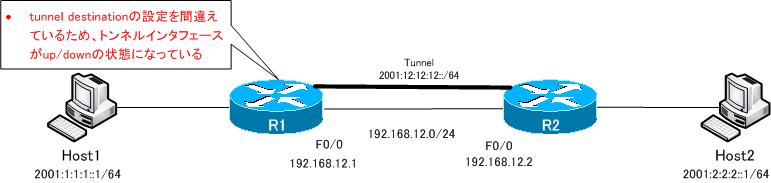
R1-R2間のトンネルインタフェースを機能させるため、R1で以下のようにtunnel destinationを正しく設定します。
R1
interface tunnel12
 tunnel destination 192.168.12.2
すると、Tunnel12インタフェースがup/up状態になり、Tunnel12経由でR1とR2はOSPFv3ネイバーを確立し、ルーティングできるようになります。そして、ホスト間のIPv6通信を問題なく行うことができます。
R1
R1#show ipv6 ospf neighbor

Neighbor ID     Pri   State           Dead Time   Interface ID    Interface
2.2.2.2           1   FULL/  -        00:00:36    7               Tunnel12
R1#show ipv6 route
IPv6 Routing Table - 7 entries
Codes: C - Connected, L - Local, S - Static, R - RIP, B - BGP
       U - Per-user Static route
       I1 - ISIS L1, I2 - ISIS L2, IA - ISIS interarea, IS - ISIS summary
       O - OSPF intra, OI - OSPF inter, OE1 - OSPF ext 1, OE2 - OSPF ext 2
       ON1 - OSPF NSSA ext 1, ON2 - OSPF NSSA ext 2
C   2001:1:1:1::/64 [0/0]
     via ::, Loopback0
L   2001:1:1:1::1/128 [0/0]
     via ::, Loopback0
O   2001:2:2:2::2/128 [110/11111]
     via FE80::C0A8:C02, Tunnel12
C   2001:12:12:12::/64 [0/0]
     via ::, Tunnel12
L   2001:12:12:12::1/128 [0/0]
     via ::, Tunnel12
L   FE80::/10 [0/0]
     via ::, Null0
L   FF00::/8 [0/0]
     via ::, Null0
R1#ping 2001:2:2:2::2 source loopback 0

Type escape sequence to abort.
Sending 5, 100-byte ICMP Echos to 2001:2:2:2::2, timeout is 2 seconds:
Packet sent with a source address of 2001:1:1:1::1
!!!!!
Success rate is 100 percent (5/5), round-trip min/avg/max = 4/13/32 ms

IPv6
- [演習] IPv6ルーティング RIPng&OSPFv3
- IPv6ヘッダフォーマット
- IPv6アドレスの表記フォーマット
- IPv6ユニキャストアドレス
- IPv6マルチキャストアドレス
- IPv6アドレスの設定方法 ~手動/SLAAC/DHCPv6~
- Cisco IPv6アドレスの設定と確認コマンド
- Cisco IPv6アドレスの設定例
- IPv6アドレス解決の仕組み
- IPv6 トンネリングの概要
- IPv6 over IPv4 スタティックトンネル
- 6to4トンネル
- ISATAPトンネル
- 基本的なIPv6ネットワークの設定例
- IPv6 設定ミスの切り分けと修正 Part1
- IPv6 設定ミスの切り分けと修正 Part2
- IPv6 設定ミスの切り分けと修正 Part3