目次
概要
MPLS-VPNを介したEIGRPおよびOSPFのルーティングについて設定ミスの切り分けと修正を行います。
ネットワーク構成
下記のネットワーク構成で、MPLS-VPNを通じてR4とR5間の通信ができるようにしたいと考えています。
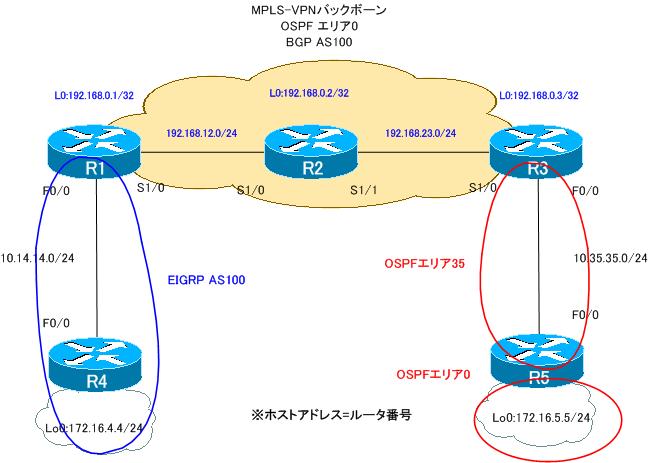
ルータの役割は、次の通りです。
PEルータ:R1、R3
Pルータ :R2
CEルータ:R4、R5
PEルータであるR1、R3ではともにVRFとして次のように定義します。
VRF名:VPN
RD:100:100
Import RT:100:100
Export RT:100:100
また、PE-CE間のルーティングプロトコルは次の通りです。
R1-R4:EIGRP AS100
R3-R5:OSPF
設定概要
各ルータで行われているMPLS-VPNでの通信に関連する設定は次の通りです。
R1
ip vrf VPN
 rd 100:100
 route-target export 100:100
 route-target import 100:100
!
interface Loopback0
 ip address 192.168.0.1 255.255.255.255
!
interface FastEthernet0/0
 ip vrf forwarding VPN
 ip address 10.14.14.1 255.255.255.0
!
interface Serial1/0
 ip address 192.168.12.1 255.255.255.0
 encapsulation ppp
 mpls ip
 no peer neighbor-route
!
router eigrp 100
 no auto-summary
 !
 address-family ipv4 vrf VPN
  redistribute bgp 100 metric 100000 10 255 1 1500
  network 10.14.14.1 0.0.0.0
  no auto-summary
 exit-address-family
!
router ospf 1
 log-adjacency-changes
 network 192.168.0.0 0.0.255.255 area 0
!
router bgp 100
 no synchronization
 bgp log-neighbor-changes
 neighbor 192.168.0.3 remote-as 100
 neighbor 192.168.0.3 update-source Loopback0
 no auto-summary
 !
 address-family vpnv4
  neighbor 192.168.0.3 activate
  neighbor 192.168.0.3 send-community extended
 exit-address-family
 !
 address-family ipv4 vrf VPN
  redistribute eigrp 100
  no synchronization
 exit-address-family
R2
interface Loopback0
 ip address 192.168.0.2 255.255.255.255
!
interface Serial1/0
 ip address 192.168.12.2 255.255.255.0
 encapsulation ppp
 mpls ip
 no peer neighbor-route
!
interface Serial1/1
 ip address 192.168.23.2 255.255.255.0
 encapsulation ppp
 mpls ip
 no peer neighbor-route
!
router ospf 1
 log-adjacency-changes
 network 192.168.0.0 0.0.255.255 area 0
R3
ip vrf VPN
 rd 100:100
 route-target export 100:100
 route-target import 100:100
!
interface Loopback0
 ip address 192.168.0.3 255.255.255.255
!
interface FastEthernet0/0
 ip vrf forwarding VPN
 ip address 10.35.35.3 255.255.255.0
 duplex auto
 speed auto
!
interface Serial1/0
 ip address 192.168.23.3 255.255.255.0
 encapsulation ppp
 mpls ip
 no peer neighbor-route
!
router ospf 35 vrf VPN
 router-id 3.3.3.3
 log-adjacency-changes
 redistribute bgp 100 subnets
 network 10.35.35.3 0.0.0.0 area 35
!
router ospf 1
 log-adjacency-changes
 network 192.168.0.0 0.0.255.255 area 0
!
router bgp 100
 no synchronization
 bgp log-neighbor-changes
 neighbor 192.168.0.1 remote-as 100
 neighbor 192.168.0.1 update-source Loopback0
 no auto-summary
 !
 address-family vpnv4
  neighbor 192.168.0.1 activate
  neighbor 192.168.0.1 send-community extended
 exit-address-family
 !
 address-family ipv4 vrf VPN
  redistribute ospf 35 vrf VPN
  no synchronization
 exit-address-family
R4
interface Loopback0
 ip address 172.16.4.4 255.255.255.0
 ip ospf network point-to-point
!
interface FastEthernet0/0
 ip address 10.14.14.4 255.255.255.0
!
router eigrp 100
 network 10.14.14.4 0.0.0.0
 network 172.16.4.4 0.0.0.0
 no auto-summary
R5
interface Loopback0
 ip address 172.16.5.5 255.255.255.0
 ip ospf network point-to-point
!
interface FastEthernet0/0
 ip address 10.35.35.5 255.255.255.0
!
router ospf 1
 log-adjacency-changes
 router-id 5.5.5.5
 network 10.35.35.5 0.0.0.0 area 35
 network 172.16.5.5 0.0.0.0 area 0
トラブルの症状
R4とR5間で通信ができません。R4およびR5のルーティングテーブルを見ると、次のようになっています。
R4 show ip route
R4#show ip route
~省略~

Gateway of last resort is not set

     172.16.0.0/24 is subnetted, 1 subnets
C       172.16.4.0 is directly connected, Loopback0
     10.0.0.0/24 is subnetted, 1 subnets
C       10.14.14.0 is directly connected, FastEthernet0/0
R5 show ip route
R5#show ip route
~省略~

Gateway of last resort is not set

     172.16.0.0/24 is subnetted, 1 subnets
C       172.16.5.0 is directly connected, Loopback0
     10.0.0.0/24 is subnetted, 1 subnets
C       10.35.35.0 is directly connected, FastEthernet0/0
トラブルを解決するためにまずPE-CE間のルーティングについて確認しました。
R1-R4間のEIGRPのルーティングを次のshowコマンドで確認しています。
R1
show ip protocols vrf VPN
show ip eigrp vrf VPN 100 interface
show ip eigrp vrf VPN 100 neighbor
R4
show ip protocols
show ip eigrp interface
show ip eigrp neighbor
R1 showコマンドの結果
R1#show ip protocols vrf VPN
Routing Protocol is "bgp 100"
  Outgoing update filter list for all interfaces is not set
  Incoming update filter list for all interfaces is not set
  IGP synchronization is disabled
  Automatic route summarization is disabled
  Redistributing: eigrp
  Maximum path: 1
  Routing Information Sources:
    Gateway         Distance      Last Update
    192.168.0.3          200      00:29:11
  Distance: external 20 internal 200 local 200

Routing Protocol is "eigrp"
  Outgoing update filter list for all interfaces is not set
  Incoming update filter list for all interfaces is not set
  Default networks flagged in outgoing updates
  Default networks accepted from incoming updates
  EIGRP metric weight K1=1, K2=0, K3=1, K4=0, K5=0
  EIGRP maximum hopcount 100
  EIGRP maximum metric variance 1
  Redistributing: bgp 100, eigrp
  EIGRP NSF-aware route hold timer is 240s
  Automatic network summarization is not in effect
  Maximum path: 4
  Routing for Networks:
    10.14.14.1/32
  Routing Information Sources:
    Gateway         Distance      Last Update
  Distance: internal 90 external 170

R1#show ip eigrp vrf VPN 100 interface

R1#show ip eigrp vrf VPN 100 neighbor
R4 showコマンドの結果
R4#show ip protocols
Routing Protocol is "eigrp 100"
  Outgoing update filter list for all interfaces is not set
  Incoming update filter list for all interfaces is not set
  Default networks flagged in outgoing updates
  Default networks accepted from incoming updates
  EIGRP metric weight K1=1, K2=0, K3=1, K4=0, K5=0
  EIGRP maximum hopcount 100
  EIGRP maximum metric variance 1
  Redistributing: eigrp 100
  EIGRP NSF-aware route hold timer is 240s
  Automatic network summarization is not in effect
  Maximum path: 4
  Routing for Networks:
    10.14.14.4/32
    172.16.4.4/32
  Routing Information Sources:
    Gateway         Distance      Last Update
    10.14.14.1            90      00:30:21
  Distance: internal 90 external 170

R4#show ip eigrp interface
IP-EIGRP interfaces for process 100
                        Xmit Queue   Mean   Pacing Time   Multicast    Pending
Interface        Peers  Un/Reliable  SRTT   Un/Reliable   Flow Timer   Routes
Fa0/0              0        0/0         0       0/1          176           0
Lo0                0        0/0         0       0/1            0           0
R4#show ip eigrp neighbor
IP-EIGRP neighbors for process 100
また、R3-R5間のOSPFのルーティングを次のshowコマンドで確認しています。
R3
show ip protocols vrf VPN
show ip ospf 35 interface
show ip ospf 35 neighbor
show ip ospf 35 database
R5
show ip protocols
show ip ospf interface
show ip ospf neighbor
R3 showコマンドの結果
R3#show ip protocols vrf VPN
Routing Protocol is "ospf 35"
  Outgoing update filter list for all interfaces is not set
  Incoming update filter list for all interfaces is not set
  Router ID 3.3.3.3
  It is an area border and autonomous system boundary router
  Redistributing External Routes from,
    bgp 100, includes subnets in redistribution
  Number of areas in this router is 2. 2 normal 0 stub 0 nssa
  Maximum path: 4
  Routing for Networks:
    10.35.35.3 0.0.0.0 area 35
 Reference bandwidth unit is 100 mbps
  Routing Information Sources:
    Gateway         Distance      Last Update
    5.5.5.5              110      00:34:23
    172.16.5.5           110      00:56:51
  Distance: (default is 110)

Routing Protocol is "bgp 100"
  Outgoing update filter list for all interfaces is not set
  Incoming update filter list for all interfaces is not set
  IGP synchronization is disabled
  Automatic route summarization is disabled
  Redistributing: ospf 35
  Maximum path: 1
  Routing Information Sources:
    Gateway         Distance      Last Update
    192.168.0.1          200      00:34:53
  Distance: external 20 internal 200 local 200

R3#show ip ospf 35 interface
FastEthernet0/0 is up, line protocol is up
  Internet Address 10.35.35.3/24, Area 35
  Process ID 35, Router ID 3.3.3.3, Network Type BROADCAST, Cost: 1
  Transmit Delay is 1 sec, State BDR, Priority 1
  Designated Router (ID) 5.5.5.5, Interface address 10.35.35.5
  Backup Designated router (ID) 3.3.3.3, Interface address 10.35.35.3
  Timer intervals configured, Hello 10, Dead 40, Wait 40, Retransmit 5
    oob-resync timeout 40
    Hello due in 00:00:07
  Supports Link-local Signaling (LLS)
  Index 1/1, flood queue length 0
  Next 0x0(0)/0x0(0)
  Last flood scan length is 1, maximum is 1
  Last flood scan time is 0 msec, maximum is 0 msec
  Neighbor Count is 1, Adjacent neighbor count is 1
    Adjacent with neighbor 5.5.5.5  (Designated Router)
  Suppress hello for 0 neighbor(s)
R3#show ip ospf 35 neighbor

Neighbor ID     Pri   State           Dead Time   Address         Interface
5.5.5.5           1   FULL/DR         00:00:38    10.35.35.5      FastEthernet0/0
R3#show ip ospf 35 database

            OSPF Router with ID (3.3.3.3) (Process ID 35)

                Router Link States (Area 0)

Link ID         ADV Router      Age         Seq#       Checksum Link count
3.3.3.3         3.3.3.3         1755        0x80000003 0x00BD68 0
5.5.5.5         5.5.5.5         1     (DNA) 0x80000002 0x0020B2 2

                Summary Net Link States (Area 0)

Link ID         ADV Router      Age         Seq#       Checksum
10.35.35.0      3.3.3.3         199         0x80000002 0x008C52
10.35.35.0      5.5.5.5         53    (DNA) 0x80000001 0x005285

                Summary ASB Link States (Area 0)

Link ID         ADV Router      Age         Seq#       Checksum
3.3.3.3         5.5.5.5         1     (DNA) 0x80000001 0x0064B6

                Router Link States (Area 35)

Link ID         ADV Router      Age         Seq#       Checksum Link count
3.3.3.3         3.3.3.3         1755        0x80000004 0x00DE8D 1
5.5.5.5         5.5.5.5         1775        0x80000004 0x005CFF 1

                Net Link States (Area 35)

Link ID         ADV Router      Age         Seq#       Checksum
10.35.35.5      5.5.5.5         201         0x80000002 0x006B44

                Summary Net Link States (Area 35)

Link ID         ADV Router      Age         Seq#       Checksum
172.16.5.0      5.5.5.5         201         0x80000002 0x003E27
R5 showコマンドの結果
R5#show ip protocols
Routing Protocol is "ospf 1"
  Outgoing update filter list for all interfaces is not set
  Incoming update filter list for all interfaces is not set
  Router ID 5.5.5.5
  It is an area border router
  Number of areas in this router is 2. 2 normal 0 stub 0 nssa
  Maximum path: 4
  Routing for Networks:
    10.35.35.5 0.0.0.0 area 35
    172.16.5.5 0.0.0.0 area 0
 Reference bandwidth unit is 100 mbps
  Routing Information Sources:
    Gateway         Distance      Last Update
    3.3.3.3              110      00:36:02
    10.35.35.3           110      00:39:31
  Distance: (default is 110)

R5#show ip ospf interface
Loopback0 is up, line protocol is up
  Internet Address 172.16.5.5/24, Area 0
  Process ID 1, Router ID 5.5.5.5, Network Type POINT_TO_POINT, Cost: 1
  Transmit Delay is 1 sec, State POINT_TO_POINT
  Timer intervals configured, Hello 10, Dead 40, Wait 40, Retransmit 5
    oob-resync timeout 40
  Supports Link-local Signaling (LLS)
  Index 2/2, flood queue length 0
  Next 0x0(0)/0x0(0)
  Last flood scan length is 0, maximum is 0
  Last flood scan time is 0 msec, maximum is 0 msec
  Neighbor Count is 0, Adjacent neighbor count is 0
  Suppress hello for 0 neighbor(s)
FastEthernet0/0 is up, line protocol is up
  Internet Address 10.35.35.5/24, Area 35
  Process ID 1, Router ID 5.5.5.5, Network Type BROADCAST, Cost: 1
  Transmit Delay is 1 sec, State DR, Priority 1
  Designated Router (ID) 5.5.5.5, Interface address 10.35.35.5
  Backup Designated router (ID) 3.3.3.3, Interface address 10.35.35.3
  Timer intervals configured, Hello 10, Dead 40, Wait 40, Retransmit 5
    oob-resync timeout 40
    Hello due in 00:00:09
  Supports Link-local Signaling (LLS)
  Index 1/1, flood queue length 0
  Next 0x0(0)/0x0(0)
  Last flood scan length is 1, maximum is 2
  Last flood scan time is 0 msec, maximum is 0 msec
  Neighbor Count is 1, Adjacent neighbor count is 1
    Adjacent with neighbor 3.3.3.3  (Backup Designated Router)
  Suppress hello for 0 neighbor(s)
R5#show ip ospf neighbor

Neighbor ID     Pri   State           Dead Time   Address         Interface
3.3.3.3           1   FULL/BDR        00:00:38    10.35.35.3      FastEthernet0/0
これらのshowコマンドによって、PE-CE間のルーティングがうまくできていないことがわかりました。設定ミスを修正すると、R4-R5間の通信が可能になりました。
問題
- PE-CE間のルーティングができていない理由はなんですか?
- MPLS-VPN経由でR4-R5間の通信ができるようにするためには、どのように設定を修正すればよいですか?
解答
PE-CE間のルーティングができていない理由はなんですか?
【R1-R4間】
R1のVRF「VPN」でEIGRPのAS番号が指定されていない。そのため、R1-R4間でEIGRPネイバーを確立できていない
【R3-R5間】
R5のOSPFエリア0とR3のスーパーバックボーン(MPLS-VPNバックボーン)が分断されいている。そのため、R3はR5のエリア0のネットワーク(172.16.5.0/24)を認識できない
MPLS-VPN経由でR4-R5間の通信ができるようにするためには、どのように設定を修正すればよいですか?
R1
router eigrp 100
address-family ipv4 vrf VPN
 autonomous-system 100
!
router bgp 100
address-familiy ipv4 vrf VPN
 redistribute eigrp 100
R3
router ospf 35 vrf VPN
 area 35 virtual-link 5.5.5.5
R5
router ospf 1
 area 35 virtual-link 3.3.3.3
ワンポイント
- VRFでのEIGRP設定ではaddress-family内にAS番号を指定する
- OSPFエリア0とスーパーバックボーンが分断されている場合はVirtual-linkが必要
解説
PEルータであるR1とR3で接続しているCEルータのR4、R5のルートを正しく認識できていません。そのため、トラブルの原因はPEルータとCEルータのルーティングにあることが推測できます。R1-R4間のEIGRPとR3-R5間のOSPFのルーティングについてそれぞれ考えていきます。
【R1-R4間】
R1-R4間ではEIGRPを利用しています。しかし、R1-R4間でEIGRPネイバーを確立できていません。その原因を調べるために一番分かりやすいのは、R1でshow ip protocols vrf VRPの出力を確認することです。
R1 show ip protocols vrf VPN
R1#show ip protocols vrf VPN
Routing Protocol is "bgp 100"
  Outgoing update filter list for all interfaces is not set
  Incoming update filter list for all interfaces is not set
  IGP synchronization is disabled
  Automatic route summarization is disabled
  Redistributing: eigrp
  Maximum path: 1
  Routing Information Sources:
    Gateway         Distance      Last Update
    192.168.0.3          200      00:29:11
  Distance: external 20 internal 200 local 200

Routing Protocol is "eigrp"
  Outgoing update filter list for all interfaces is not set
  Incoming update filter list for all interfaces is not set
  Default networks flagged in outgoing updates
  Default networks accepted from incoming updates
  EIGRP metric weight K1=1, K2=0, K3=1, K4=0, K5=0
  EIGRP maximum hopcount 100
  EIGRP maximum metric variance 1
  Redistributing: bgp 100, eigrp
  EIGRP NSF-aware route hold timer is 240s
  Automatic network summarization is not in effect
  Maximum path: 4
  Routing for Networks:
    10.14.14.1/32
  Routing Information Sources:
    Gateway         Distance      Last Update
  Distance: internal 90 external 170
これを見ると、VRF「VPN」のEIGRPではAS番号の情報がないことがわかります。VRFでEIGRPを設定する場合は、address-familly内にAS番号の指定が必要です。R1でVRF「VPN」のEIGRPの設定でAS番号の指定が抜けているので、R1とR4はEIGRPネイバーになれません。次のように、R1のVRF「VPN」のEIGRP設定でAS番号を指定すれば、R1-R4間は正常にルーティングできるようになります。
R1 VRF「VPN」のEIGRPでAS番号を指定
router eigrp 100
address-family ipv4 vrf VPN
 autonomous-system 100
VRF内でAS番号を指定したあと、EIGRPのインタフェース、ネイバー、ルーティングテーブルを確認すると、次のようになります。
R1#show ip eigrp vrf VPN 100 interfaces
IP-EIGRP interfaces for process 100
                        Xmit Queue   Mean   Pacing Time   Multicast    Pending
Interface        Peers  Un/Reliable  SRTT   Un/Reliable   Flow Timer   Routes
Fa0/0              1        0/0      1282       0/1         7920           0
R1#show ip eigrp vrf VPN 100 neighbors
IP-EIGRP neighbors for process 100
H   Address                 Interface       Hold Uptime   SRTT   RTO  Q  Seq
                                            (sec)         (ms)       Cnt Num
0   10.14.14.4              Fa0/0             11 00:00:40 1282  5000  0  4
R1#show ip rou
R1#show ip route vrf VPN

Routing Table: VPN
~省略~

Gateway of last resort is not set

     172.16.0.0/24 is subnetted, 1 subnets
D       172.16.4.0 [90/156160] via 10.14.14.4, 00:00:46, FastEthernet0/0
     10.0.0.0/24 is subnetted, 2 subnets
B       10.35.35.0 [200/0] via 192.168.0.3, 00:27:27
C       10.14.14.0 is directly connected, FastEthernet0/0
また、R1がR3へ172.16.4.0/24のルートをMP-BGPでアドバタイズできるように、VRF「VPN」のEIGRPをBGPへ再配送します。
R1 VRF「VPN」のEIGRPルートをBGPへ再配送
router bgp 100
address-familiy ipv4 vrf VPN
 redistribute eigrp 100
これでR1-R4間のEIGRPのルーティングは問題ないことがわかります。
【R3-R5間】
R3-R5間はOSPFを利用しています。MPLS-VPNでPE-CE間のルーティングにOSPFを利用するときはエリア構成に注意が必要です。MPLS-VPNバックボーンをスーパーバックボーンとして、バックボーンエリアのように扱います。そのため、問題のエリア構成ではスーパーバックボーンとエリア0が分断されてしまい、分断されているエリア0のルートを正しく認識できません。R3でOSPF LSDBを見ると、LSAタイプ3で172.16.5.0/24のルートを学習しています。
R3 show ip ospf 35 database/show ip ospf 35 database summary
R3#sh ip ospf 35 database

            OSPF Router with ID (3.3.3.3) (Process ID 35)

                Router Link States (Area 35)

Link ID         ADV Router      Age         Seq#       Checksum Link count
3.3.3.3         3.3.3.3         1821        0x80000002 0x00E28B 1
5.5.5.5         5.5.5.5         1822        0x80000002 0x0060FD 1

                Net Link States (Area 35)

Link ID         ADV Router      Age         Seq#       Checksum
10.35.35.5      5.5.5.5         1822        0x80000001 0x006D43

                Summary Net Link States (Area 35)

Link ID         ADV Router      Age         Seq#       Checksum
172.16.5.0      5.5.5.5         1863        0x80000001 0x004026
R3#show ip ospf 35 database summary

            OSPF Router with ID (3.3.3.3) (Process ID 35)

                Summary Net Link States (Area 35)

  LS age: 1981
  Options: (No TOS-capability, DC, Upward)
  LS Type: Summary Links(Network)
  Link State ID: 172.16.5.0 (summary Network Number)
  Advertising Router: 5.5.5.5
  LS Seq Number: 80000001
  Checksum: 0x4026
  Length: 28
  Network Mask: /24
        TOS: 0  Metric: 1
しかし、スーパーバックボーンとエリア0が分断されていて、エリア構成が正しくないので172.16.5.0/24に対するLSAタイプ3のルートは利用されていません。分断されているスーパーバックボーンとエリア0をVirtual-linkで接続します。R3とR5で次のようにVirtual-linkの設定を行います。
R3 R5に対するVirtual-link
router ospf 35 vrf VPN
 area 35 virtual-link 5.5.5.5
R5 R3に対するVirtual-link
router ospf 1
 area 35 virtual-link 3.3.3.3
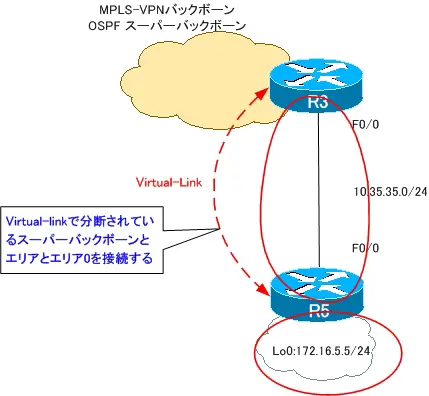
Virtual-linkを設定すれば、R3はR5の172.16.5.0/24のルートを正しく認識して、ルーティングテーブルに登録します。
R3 show ip route vrf VPN
R3#show ip route vrf VPN

Routing Table: VPN
~省略~
Gateway of last resort is not set

     172.16.0.0/24 is subnetted, 2 subnets
B       172.16.4.0 [200/156160] via 192.168.0.1, 00:06:53
O       172.16.5.0 [110/2] via 10.35.35.5, 00:05:30, FastEthernet0/0
     10.0.0.0/24 is subnetted, 2 subnets
C       10.35.35.0 is directly connected, FastEthernet0/0
B       10.14.14.0 [200/0] via 192.168.0.1, 00:06:53
これでR3-R5間のルーティングも問題なく行えるようになります。
最終的に、R4、R5ではお互いのルートをルーティングテーブルに登録できるようになり、通信も可能です。
R4 show ip route/ping 172.16.5.5 source 172.16.4.4
R4#show ip route
~省略~
Gateway of last resort is not set

     172.16.0.0/24 is subnetted, 2 subnets
C       172.16.4.0 is directly connected, Loopback0
D EX    172.16.5.0 [170/30720] via 10.14.14.1, 00:08:11, FastEthernet0/0
     10.0.0.0/24 is subnetted, 2 subnets
D EX    10.35.35.0 [170/30720] via 10.14.14.1, 00:09:58, FastEthernet0/0
C       10.14.14.0 is directly connected, FastEthernet0/0
R4#ping 172.16.5.5 source 172.16.4.4

Type escape sequence to abort.
Sending 5, 100-byte ICMP Echos to 172.16.5.5, timeout is 2 seconds:
Packet sent with a source address of 172.16.4.4
!!!!!
Success rate is 100 percent (5/5), round-trip min/avg/max = 20/31/52 ms
MPLS/MPLS-VPN
- MPLSラベルスイッチングの設定と確認コマンド[Cisco]
- MPLSによるラベルスイッチングの設定例 [Cisco]
- MPLSによるトランジットASの構成
- MPLS 設定ミスの切り分けと修正 Part1
- MPLS 設定ミスの切り分けと修正 Part2
- MPLS-VPNの設定例 フルメッシュ(Any-to-Any)
- MPLS-VPNの設定例 エクストラネットVPN
- MPLS-VPNの設定例 セントラルサービスVPN
- MPLS-VPNの設定例 ハブ&スポークVPN
- OSPF Sham-linkの概要
- OSPF Sham-linkの設定
- MPLS-VPN 設定ミスの切り分けと修正 Part1
- MPLS-VPN 設定ミスの切り分けと修正 Part2
- MPLS-VPN 設定ミスの切り分けと修正 Part3
- MPLS-VPN 設定ミスの切り分けと修正 Part4
- MPLS-VPN 設定ミスの切り分けと修正 Part5
- MPLS-VPN 設定ミスの切り分けと修正 Part6

