
Table of Contents
概要
BGPルートにWell-known COMMUNITYを付加すると、自動的にルートフィルタが行われます。no_advertise/no_export/local_asのWell-known COMMUNITYによるルートフィルタの設定例です。
ネットワーク構成
次のネットワーク構成で、Well-known COMMUNITYの動作をみていきましょう。
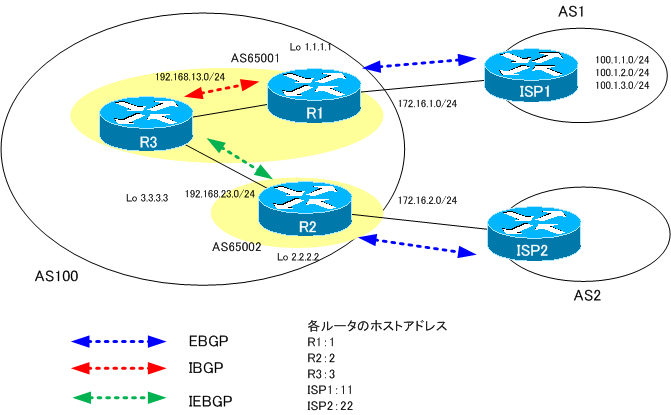
ここでは単純にするために、AS1のISP1が生成する100.1.1.0/24、100.1.2.0/24、100.1.3.0/24の3つのルートだけを考えます。
Well-known COMMUNITYの付加
ISP1が生成するルートについて、伝わる範囲を制限します。
- 100.1.1.0/24はR1まで
- 100.1.2.0/24はR3まで
- 100.1.3.0/24はR2まで
これを実現するために、ISP1は次のようにWell-known COMMUNITYを付加します。
- 100.1.1.0/24にno_advertise
- 100.1.2.0/24にlocal_as
- 100.1.3.0/24にno_export
100.1.1.0/24はR1から先のいかなるネイバーにも送信しないようにno_advertiseのWell-known COMMUNITYを付加します。100.1.2.0/24にはコンフェデレーション構成のサブASから外部に出て行かないようにlocal_asのWell-known COMMUNITYを付加します。100.1.3.0/24には、AS100から外に出て行かないようにno_exportのWell-known COMMUNITYを付加します。
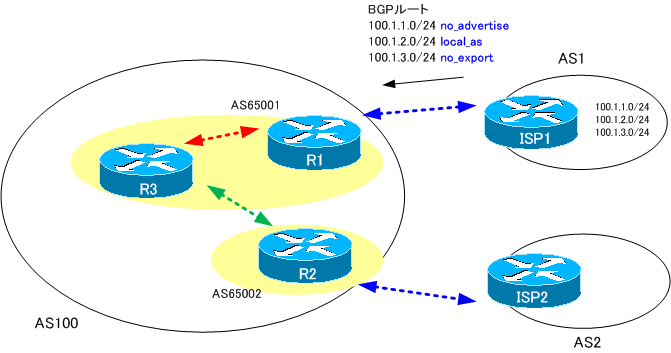
ISP1では、次のように設定して各ルートにWell-known COMMUNITYを付加します。
ISP1 Well-known COMMUNITYの付加
access-list 10 permit 100.1.1.0
access-list 20 permit 100.1.2.0
access-list 30 permit 100.1.3.0
!
route-map COMMUNITY permit 10
 match ip address 10
 set community no-advertise
route-map COMMUNITY permit 20
 match ip address 20
 set community local-AS
route-map COMMUNITY permit 30
 #match ip address 30
 set community no-export
route-map COMMUNITY permit 1000
!
router bgp 1
 neighbor 172.16.1.1 route-map COMMUNITY out
R1でISP1によって付加されたCOMMUNITYを確認します。
R1 show ip bgp community
R1#show ip bgp community

R1#
ISP1で付加されたはずのCOMMUNITYをR1では確認できません。これは、CiscoルータではデフォルトでBGPルートを送信するときにCOMMUNITYを削除するからです。COMMUNITYを削除せずにルートを送信するためには、neighbor send-communityの設定が必要です。ISP1でneighbor send-communityの設定を追加します。
ISP1 neighbor send-community
router bgp 1
 neighbor 172.16.1.1 send-community
ISP1でルートを再送信してR1で再度COMMUNITYを確認すると、次のようになります。
R1 show ip bgp community
R1#show ip bgp community
BGP table version is 7, local router ID is 1.1.1.1
Status codes: s suppressed, d damped, h history, * valid, > best, i - internal,
              r RIB-failure, S Stale
Origin codes: i - IGP, e - EGP, ? - incomplete

   Network          Next Hop            Metric LocPrf Weight Path
*> 100.1.1.0/24     172.16.1.11              0             0 1 i
*> 100.1.2.0/24     172.16.1.11              0             0 1 i
*> 100.1.3.0/24     172.16.1.11              0             0 1 i
R1#show ip bgp 100.1.1.0
BGP routing table entry for 100.1.1.0/24, version 7
Paths: (1 available, best #1, table Default-IP-Routing-Table,
                                              not advertised to any peer)
Flag: 0x880
  Not advertised to any peer
  1
    172.16.1.11 from 172.16.1.11 (111.1.1.11)
      Origin IGP, metric 0, localpref 100, valid, external, best
      Community: no-advertise
R1#show ip bgp 100.1.2.0
BGP routing table entry for 100.1.2.0/24, version 6
Paths: (1 available, best #1, table Default-IP-Routing-Table,
                                              not advertised outside local AS)
Flag: 0x880
  Advertised to non peer-group peers:
  3.3.3.3
  1
    172.16.1.11 from 172.16.1.11 (111.1.1.11)
      Origin IGP, metric 0, localpref 100, valid, external, best
      Community: local-AS
R1#show ip bgp 100.1.3.0
BGP routing table entry for 100.1.3.0/24, version 5
Paths: (1 available, best #1, table Default-IP-Routing-Table,
                                               not advertised to EBGP peer)
Flag: 0x880
  Advertised to non peer-group peers:
  3.3.3.3
  1
    172.16.1.11 from 172.16.1.11 (111.1.1.11)
      Origin IGP, metric 0, localpref 100, valid, external, best
      Community: no-export
ISP1でneighbor send-communityの設定をすれば、COMMUNITYが削除されないことがわかります。COMMUNITYを利用した制御を行うためには、必ずneighbor send-communityの設定が必要なので忘れないように気をつけてください。ISP1だけでなくCOMMUNITYによる制御を行うすべてのネイバーに対して設定してください。
no_advertiseのBGPルートのフィルタ
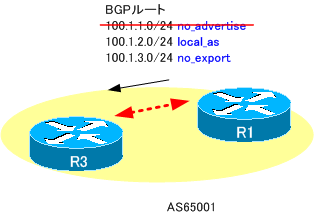
次にWell-known COMMUNITYによるルートの制御について確認しましょう。R1からR3へ送信しているルートをみると、次の通りです。
R1からR3へ送信しているルート
R1#show ip bgp neighbors 3.3.3.3 advertised-routes
BGP table version is 7, local router ID is 1.1.1.1
Status codes: s suppressed, d damped, h history, * valid, > best, i - internal,
              r RIB-failure, S Stale
Origin codes: i - IGP, e - EGP, ? - incomplete

   Network          Next Hop            Metric LocPrf Weight Path
*> 100.1.2.0/24     172.16.1.11              0             0 1 i
*> 100.1.3.0/24     172.16.1.11              0             0 1 i
R1からR3へはno_advertiseが付加されている100.1.1.0/24を送信していないことがわかります。
local_asのBGPルートのフィルタ
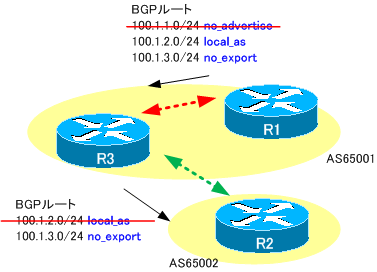
続いて、R3からR2へのルートの送信を確認します。
R3からR2へ送信しているルート
R3#show ip bgp
BGP table version is 7, local router ID is 100.100.1.3
Status codes: s suppressed, d damped, h history, * valid, > best, i - internal,
              r RIB-failure, S Stale
Origin codes: i - IGP, e - EGP, ? - incomplete

   Network          Next Hop            Metric LocPrf Weight Path
*>i100.1.2.0/24     1.1.1.1                  0    100      0 1 i
*>i100.1.3.0/24     1.1.1.1                  0    100      0 1 i
R3#show ip bgp neighbors 2.2.2.2 advertised-routes
BGP table version is 7, local router ID is 100.100.1.3
Status codes: s suppressed, d damped, h history, * valid, > best, i - internal,
              r RIB-failure, S Stale
Origin codes: i - IGP, e - EGP, ? - incomplete

   Network          Next Hop            Metric LocPrf Weight Path
*>i100.1.3.0/24     1.1.1.1                  0    100      0 1 i
R3からみるとR2はIEBGPネイバーです。そのため、local_asが付加されている100.1.2.0/24のルートを送信していないことがわかります。
no_exportのBGPルートのフィルタ
また、R2からISP2へのルート送信は次の通りです。
R2からISP2へ送信しているルート
R2#show ip bgp
BGP table version is 7, local router ID is 2.2.2.2
Status codes: s suppressed, d damped, h history, * valid, > best, i - internal,
              r RIB-failure, S Stale
Origin codes: i - IGP, e - EGP, ? - incomplete

   Network          Next Hop            Metric LocPrf Weight Path
*> 100.1.3.0/24     1.1.1.1                  0    100      0 (65001) 1 i
R2#show ip bgp neighbors 172.16.2.22 advertised-routes

Total number of prefixes 0
R2からみるとISP2はEBGPネイバーです。そのため、no_exportのCOMMUNITYが付加されている100.1.3.0/24のルートを送信しません。
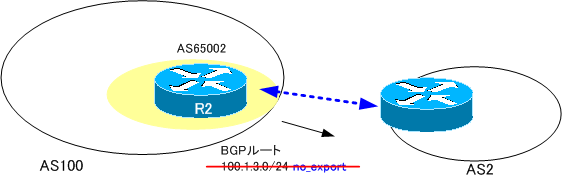
このようにWell-known COMMUNITYを付加すると、そのCOMMUNITYに応じて自動的にフィルタがかかり、ルートが伝わる範囲を限定することができます。

BGPの仕組み
- BGPベストパス選定プロセス
- BGPの概要 ~AS間でルート情報を交換~
- BGPの動作
- BGPの基本設定と確認コマンド
- BGPピアグループ(Peer Group) ~ネイバーの設定をまとめよう~
- BGPネイバーの状態
- BGPコンフェデレーションの設定
- BGPコンフェデレーションの設定例
- BGPネイバー認証
- BGP Well Known Mandatory アトリビュート -ORIGIN/AS_PATH/NEXT_HOP-
- 図解!BGPベストパス選択アルゴリズム
- BGP 基本的な設定についての演習[Cisco]
- BGPの基本的な設定についての演習 ~トラブルシュート~
- BGP KEEPALIVEタイマ/ホールドタイムの設定
- BGPルート 最小送信間隔の設定
- BGPルートダンプニング
- マルチホーム – インターネット接続の冗長化 –
- マルチホームAS BGPルートフィルタのポイント
- マルチホームAS ベストパス選択のポイント
- マルチホームAS IGPとBGPの連携のポイント
- マルチホームAS BGPの設定例
- IP-VPNでのBGPの利用 設定例
- BGPルートフィルタの種類
- BGPルートフィルタ -ディストリビュートリスト-
- BGPルートフィルタ -ディストリビュートリスト設定例-
- BGPルートフィルタ -プレフィクスリスト-
- BGPルートフィルタ -プレフィクスリスト設定例-
- BGPルートフィルタ -フィルタリスト(AS_PATH ACL)-
- BGPルートフィルタ -フィルタリスト(AS_PATH ACL)設定例-
- BGPルートフィルタ -ルートマップ(route-map)-
- BGPルートフィルタ -ルートマップ(route-map)設定例-
- BGP neighbor allowas-inコマンド
- BGP neighbor as-overrideコマンド
- BGPルート RIB Failure
- BGPルート アドミニストレイティブディスタンスの制御
- BGPルートの負荷分散
- BGPルート 条件付き生成
- BGPルート 条件付きアドバタイズ
- BGP ルート集約 自動集約
- BGPルート集約 networkコマンドによる集約
- BGPルート集約 networkコマンドによる集約 設定例
- BGP ルート集約 aggregate-addressコマンドによる集約
- aggregate-addressコマンドのオプション summary-only
- aggregate-addressコマンドのオプション attribute-map
- aggregate-addressコマンドのオプション as-set
- aggregate-addressコマンドのオプション advertise-map
- aggregate-addressコマンド as-set/attribute-map/advertise-map 設定例
- BGP選択型集約の概要
- BGP選択型集約 suppress-map
- BGP選択型集約 unsuppress-map
- BGP 選択型集約 suppress-map/unsuppress-map 設定例
- BGP local-as ~ネイバーに他のASのように見せる~
- BGP neighbor remove-private-ASコマンド
- bgp fast external-fallover
- BGP プレフィクス数の制限
- BGP COMMUNITYアトリビュートの使い方
- BGP Well-known COMMUNITYのルートフィルタ設定例
- BGP プライベートCOMMUNITYによるルート制御の設定例
- [演習]BGP応用 Part1:BGP基本設定
- [演習]BGP応用 Part2:ルート集約
- [演習]BGP応用 Part3:ポリシーベースルーティング
- [演習]BGP応用 Part4:トラブルシューティング
- BGP 設定ミスの切り分けと修正 Part1
- BGP 設定ミスの切り分けと修正 Part2
- BGP 設定ミスの切り分けと修正 Part3
- BGP 設定ミスの切り分けと修正 Part4
- BGP 設定ミスの切り分けと修正 Part5
- BGP 設定ミスの切り分けと修正 Part6
- BGP 設定ミスの切り分けと修正 Part7
- IPv6 BGPの設定例 Part1
- IPv6 BGPの設定例 Part2
- 2021年10月4日 Facebookに何が起こったか?
- IPv4 BGPネイバーでのIPv6プレフィックスの交換